It doesn’t matter what the UK government says, the majority of the UK public is reluctant to hand over additional surveillance powers that require tech companies to build backdoors to access encrypted communications. That’s based on a poll release Thursday by the Center for Democracy and Technology (CDT), a US-based advocacy group.
UK officials still want to wreck encryption
The poll comes as the UK government renews its attempts to pursue a top secret order to force Apple to build a backdoor into iCloud encryption, even if doing so will make people less safe. There’s little doubt any state-mandated backdoor would be found and exploited by today’s new generation of AI-augmented hacking systems.
What makes it worse is the underhand way the UK attempted to put these new rules in place. While we know Apple ceased offering Advanced Data Protection in the UK in response to these demands in 2025 — and opposed the demands at the time — we don’t know what arguments were made. The US said last year the order was being dropped, but Apple is now returning to court to fight a renewed attempt.
When the government issued the euphemistically-named “Technical Capability Notice” to Apple requiring backdoor access to encrypted iCloud data, it not only prohibited Apple from disclosing the order, but “most of the British public (55%) were unaware it had happened at all.” That’s because the UK kept it all out of sight. Privacy International and Liberty are also challenging the use of Technical Capability Notices.
The UK public does not agree with its leaders
CDT polled 2,000 people in the UK to find out if they supported the government’s efforts to quash encryption with dangerous backdoors. Just 12% of respondents agreed the government should have the power to access private data; the vast majority opposed the idea.
The nature of the government’s approach is that UK citizens will not be told if they’re being subjected to surveillance. That really offends people, the survey says; 87% think the government should be legally obliged to tell people when their private conversations have been reviewed.
“The British public instinctively know that being able to communicate privately is crucial to our individuality and to the survival of a free and open society,” said Jim Killock, executive director of Open Rights Group. “The government persists with the myth that it can weaken encryption to target the bad guys only. Attacks on the security of our phones, security tools and messaging apps harm us all and make our democracy weaker.”
The poll reveals a lot more. People in the UK overwhelmingly believe they have the right to private conversations online and that no one should be able to access their personal messages without a court order and user notice. They also want meaningful constraints on use of these surveillance powers and also believe — rightly — that the security risks of backdoors far outweigh any benefits.
There’s also a significant concern about the impact of encryption erosion on free speech and personal privacy. “The vast majority of the British public believe there are better ways to tackle serious crimes than accessing encrypted messages” CDT argued.
The devil in the government plan relates to encryption.
Encryption cannot be selectively weak
This is fundamental to internet communications, and a lack of secure encryption threatens all kinds of online data communication. It’s not just email; banking, finance, and everything else all rely on encryption. Any move to weaken it anywhere in the stack will weaken it everywhere else. That’s bad for people, bad for free speech, and bad for business.
Alan Woodward, visiting professor at Surrey Center for Cyber Security at the University of Surrey stressed, “Encryption keeps our bank details, medical records and family conversations safe. It cannot be weakened for criminals without being weakened for everyone. Private communication is not a luxury. It is a condition of a thriving democracy.”
Paul Strasburger, chair of Big Brother Watch, agrees: “Strong encryption is essential to protect our data and our commerce from attack by organized crime and rogue states,” he told the government last year during a debate on the matter in the House of Lords. “Any weakness inserted into encryption for the benefit of the authorities is also available to those who would do us harm — yet that is precisely what the government are demanding from Apple.”
No one wants this
What’s also interesting about the poll is that opposition to the UK government plans comes from across the political divide. “The public are not naive about online crime, but Green, Labour, Conservative, Liberal Democrats, and Reform voters alike simply do not accept that accessing everyone’s private messages is the way to stop it,” said Carly Munnelly, director at Public First.
That’s because in an accelerated, AI-augmented modern digital threat environment, no one is safe until everyone is safe. The data suggests that people in the UK recognize this. The government, meanwhile, continues to avoid meaningful public scrutiny on what it’s doing by refusing to confirm or deny that any such order exists.
Earlier this year, Meta, one of the industry’s loudest AI advocates, was ready to slash up to 60% of the members of some teams and replace them with AI, as part of what it called Project OT (Organization Transformation), an initiative to make Meta “AI native.”
But it backed off at the last minute after internal data showed that the plan wasn’t working out, according to a Reuters investigation published Wednesday. For example, Reuters said, code changes made to the internal software platforms and infrastructure that employees used on the job were up 220% year-over-year, according to an early June post by Meta CTO Andrew Bosworth, yet changes that led to new or upgraded features reaching Meta users were only up 36%.
Meta executives also saw “’reliability warning signs’ caused by the AI coding surge,” according to an internal post, Reuters reported. “Another post, in April, said that unchecked AI agents were performing ‘large-scale, disruptive actions that humans are unlikely to execute.’ The result: Major technical and security incidents, such as service disruptions and possible data leaks, spiked 40% from the previous year, with the time staffers had to spend firefighting them up 70%.”
Reuters also noted that, in April, Meta had mandated that tracking software be installed on US employees’ devices to capture their keystrokes and mouse clicks to teach its AI agents to replicate how humans interact with computers. Believing they might be training their own AI replacements, employees rebelled.
To try and placate the workers, Meta promised to increase spending on travel and social events, and “to improve snack quality in office microkitchens.” Unsurprisingly, none of that seemed to help boost morale, and, Reuters reported, “Zuckerberg has stuck to the words ‘company-wide’ and ‘this year’ in discussing layoffs with employees, according to his internal communications. That has prompted some employees to speculate that he’ll continue trimming the ranks via team-specific cuts or performance-based dismissals – or delay company-wide headcount reductions until next year.”
A cautionary tale
Consultants and analysts said enterprise IT executives should read the Meta story carefully, because it precisely illustrates what happens when AI marketing hype is not challenged aggressively.
Noted Sanchit Vir Gogia, chief analyst at Greyhound Research, “Meta trusted a forecast of AI capability before it existed in production, a different failure from trusting AI too much.”
He said, “Meta booked a forecast as capacity. Agents will improve, but the error was budgeting that improvement as production capacity before it arrived. Prove the action before widening the authority, and the authority before removing the human control. Only then is removing human capacity a decision, not a bet.”
Terra Higginson, a principal research director at Info-Tech Research Group, added that no experienced enterprise IT leader should be surprised by Meta’s experience.
“Unchecked AI agents are a bad idea. Removing humans is a bad idea. That’s not the future anyone wants,” she said. “We want work to be reimagined so the human part still matters and technology makes it better. We are all still wrapping our heads around how AI and agentic AI will change the way we work.”
She noted, “what we are already seeing, though, is lots of output and action without always getting the outcome we actually want. We should not use AI output as a proxy for productivity. Humans bring judgment and friction before taking actions with significant consequences; agents can remove that friction. We don’t want easy outcomes, we want good outcomes.”
Tom Findling, CEO of Conifers.ai, also suggested that IT leaders should take the Meta report as “the best opportunity” to go to their board and argue that this is what happens with unchecked AI rollouts.
“Tell them that we now have the opportunity to get it right. Say that you may not get a 500% productivity boost, but IT can show them a meaningful way to get 300%,” Findling said. “If you don’t want to end up like Meta, there is a way.”
Justin Greis, CEO of consulting firm Acceligence, added that he thinks that IT’s takeaway from the Meta situation is the disconnect between activity and actual value creation.
“AI can make an organization extraordinarily busy without necessarily making it more productive,” he said. “We have spent decades teaching technology leaders that lines of code, tickets closed, and projects launched are imperfect proxies for business value. AI makes that measurement problem much more acute because it can manufacture activity at machine speed.”
If an AI agent produces ten times as much code, analysis, or work product, that does not mean the enterprise created ten times as much value, Greis said. “It may simply mean the company created ten times as much material that somebody now has to validate, secure, integrate, maintain, or clean up. That is why I think the most important question for executives is not ‘How much work can AI produce?’ It is ‘What measurable business outcome improved because AI produced it?’”
Apple wasn’t joking when it warned us that competitors want access to our most private data. Now, OpenAI’s ChatGPT has introduced a new plugin that can control Apple’s Messages app on Macs. This follows the earlier introduction of a new Computer History feature that monitors what you do on your Mac. And while I don’t think Apple will challenge the new feature — yet — on the Mac, I do see trouble ahead on other platforms.
So, what’s ChatGPT’s new thing? Its latest tool means you can use the tool to read, write and send texts via Messages. The app can also search through messages and get message summaries and other information directly from Messages.
What is happening?
“The Apple Messages plugin is available on all plans in the ChatGPT desktop app for macOS,” says OpenAI. “In Codex and ChatGPT Work, it can read and search iMessage, SMS, and RCS chats on your Mac and send messages on your behalf through the Messages app. It doesn’t let you interact with ChatGPT remotely through Messages, and it doesn’t work in regular ChatGPT chats.”
So, if you’ve ever wanted an AI system to go through all your messages to pluck out insights, you’re in luck (though you’ll probably want to check in with corporate legal before doing so). The system does require user consent before working, and OpenAI itself suggests such permission is given only on a per-use, rather than a blanket basis.
How might you use this tool?
ChatGPT’s tool is not dissimilar to the contextual personal data insights promised by Apple’s SiriAI. You might use it to search for information buried in old messages, create new messages, delete them, and more. You might get ChatGPT to recommend a set of secure browser and messaging services you could use without sharing your information with an AI company and ask it to write a cheery message about dystopia for you, for example. There’s an ad featuring much more mundane examples here.
The company has suggested some prompts, including:
Suggest follow ups from yesterday in messages.
Check my calendar and reply to (contact name) with a few times I’m free for dinner next week.
Find birthdays in Messages and add them to my calendar.
How does it work?
The way the system works isn’t quite as clear as I’d like it to be, given the personal data being parsed, along with recent history on how ChatGPT protects such data on Macs.
OpenAI told Bloomberg the plug-in runs locally on the Mac, and doesn’t create an index of a user’s messages. But that may not mean much, given the system does read a user’s existing messages and presumably has some kind of record of the data analysis itself. It is also not especially reassuring that OpenAI tells people not to turn on persistent approval, saying that doing so, “removes your final chance to review a message before ChatGPT sends it as you.”
Perhaps of more concern is that the plugin also demands Full Disk Access in System Settings, along with access to contact names and automation tools.
Something to think about
The degree to which OpenAI is digging into the macOS to make these features work is already driving some backlash. Some apologists tend to dismiss concerns around privacy, while others warn that AI automation is becoming an always-on surveillance system that itself becomes a target for exploitation and attack. Both sides may have a point. But what I don’t see yet is any clear transparency around how the system delivers all its promised convenience without undermining user privacy. It’s all well and good to require consent to make the AI magic happen, but it would be far better, and more legitimate, for such consent to be informed.
It also seems very likely OpenAI plans to bring similar features to iPhones and iPads, which might yet open up a new front in Apple/OpenAI’s ongoing litigation around the provision of equal access to user data. That’s particularly true in Europe, where the Digital Markets Act requires Apple to provide third-party AI developers with the same deep system-level APIs and device access that Apple uses for its own AI tools.
It remains to be seen how Apple intends to meet that commitment, particularly as it has chosen not to offer SiriAI in Europe until it can agree on some way to offer that kind of access to third parties while continuing to protect user privacy. It is also hard to ignore that ChatGPT on a Mac has now become a prime target for hackers; if they can’t get into Messages directly, now all they need to do is hack the ChatGPT app to do it for them — perhaps using ChatGPT to help them build the code with which to do it.
What’s next?
I don’t think Apple will challenge OpenAI’s approach for now, as the company doesn’t appear to have actively subverted Mac security protection. But I do predict a showdown on iOS, particularly if Apple is unable to build support for the “trusted intermediary” approach it originally proposed to the EU, if only because of the wider extent of information collected on mobile. It also puts yet another slant on the ongoing litigation between both companies.
While Slack already integrates with several coding agents, developers have to interact with them independently to get work done. The aim of Slack Code is to make agents available to multiple coworkers in shared, project-based “code channels.”
“We built code channels to be this multi-player AI experience and bring more development into Slack,” said Sateja Parulekar, vice president of product marketing at Slack. “It’s not just engineers and product managers who are working with the coding agents; it’s the marketers, the product designers who are now able to interact with a coding agent in a safe, governed environment.”
Slack code channels are intended for one-off coding sessions and projects — building a new application feature, updating a web page, or fixing a bug, for example.
When the coding agent is tagged in a Slack channel or DM with a request, it automatically creates a new code channel, adds links to required documents, and invites relevant participants.
The code channel functions just like a normal Slack channel, with participants able to send messages and files as usual, while also letting them interact with a coding agent and track outputs via the channel’s “session artifacts.” These artifacts include “code diffs” that highlight changes to code made by the agent, as well as Slack “canvas” documents and live HTML that displays prototypes and previews created by the agent.
All participants can use natural language to direct the agent, making suggestions and signing-off on outputs, for instance. Any updates are then highlighted in the original Slack channel. And when a task or project is complete, the code channel is automatically archived.
Slack Code channels can also be customized — Slack admins can create guardrails to prevent non-technical workers from shipping code without engineering review, for example.
Code channels adhere to Slack’s existing security and permissions model, the company said, with agents able to access conversations and data based on controls set for a Slack workspace.
At launch, four agents integrate with Slack Code — Claude Code, Devin, GitHub Copilot, and Vercel — though Slack intends to expand the list of options over time. Slack Code is available at no extra cost on all Slack subscriptions.
“Slack Code closes the gap between where work gets done and where code gets written with dedicated spaces built for output along project-based channels right in Slack,” said Wayne Kurtzman, research vice president at IDC. “This furthers the Salesforce goal of making work more seamless and multi-player within the Slack environment, regardless of the other applications the business is using.
“While Slack Code may seem early to market for some companies, others are leveraging the first-mover advantage.”
While software development and coordination work “has happened in Slack forever,” according to Will McKeon-White, senior analyst at Forrester, the new features make it “easier to just stay in Slack only and [open] up who is involved with the actual code creation.”
For IT staffers who enable Slack Code, the immediate consideration involves permissions, he said — “a persistent challenge for anything multiplayer.” McKeon-White cites various approaches: “…Some inherit user permissions based on task, some have persistent permissions with different ‘invoking’ permissions for users, some inherit the permissions of the room. Each has flaws.”
The longer-term challenge, he said, is around multi-agent collaboration.
“Multi-agent collab today in successful environments isn’t very dynamic,” said McKeon-White. “Having true dynamic agents cooperating can create extremely interesting emergent behavior,” he said, pointing to recent Anthropic research on the topic.
While Slack Code is aimed at software development-related tasks, Slack also envisages a similar cross-functional, collaborative approach to AI agent interactions applied to a wider variety of purposes: marketing campaigns, for instance, or legal document reviews.
“That might not involve code per se, but it does involve a very detailed review of a document and tracking changes and a preview of what’s going to be sent out to the customer,” said Parulekar. “In the future, we see this extending to a lot of different teams and use cases for technical and non-technical users.”
Other features announced Thursday include “agent DMs” that allow for individual interactions with an agent and a new “agents tab” where users can view existing agent conversations.
Parulekar said Slack Code feeds into a wider Slack strategy centered on a “multi-player experience” for human workers and AI agents. This includes the recent announcement of Claude Tag, which makes Anthropic’s agent available to teams.
“Whether it’s the user experience that we’re evolving — like the agent tab, or coding channels where you can plan, code, test, and ship inside of Slack — it’s all part of that bigger vision of making Slack a great home for agents and furthering that vision of multiplayer AI,” she said.
OpenAI is adding a new safety capability that allows enterprises to detect misuse of its AI systems across multiple interactions without retaining prompts or responses, enabling risk monitoring while preserving its Zero Data Retention (ZDR) commitments.
“OpenAI does not retain…prompts or model responses after a request is processed,” the company said in a blog post, describing its ZDR approach. The new system, called Private Safety Processing, is “designed to identify patterns across related interactions without giving OpenAI personnel access to the underlying content.”
The capability is being tested with eligible enterprise and API customers and is intended to address a limitation in existing safety controls that evaluate interactions individually, making it harder to detect risks that unfold over time.
What does Private Safety Processing do
Private Safety Processing is designed to extend existing safety systems by correlating activity across related interactions rather than analyzing each prompt in isolation, according to OpenAI.
Under the model, automated systems analyze interactions and generate “a narrowly defined signal indicating the type of activity involved,” instead of exposing the underlying prompts or responses, according to OpenAI.
The system can operate whether customer data remains within enterprise-controlled infrastructure or is stored by OpenAI with encryption keys controlled by the customer, the company said.
“In both cases, automated systems can identify potential misuse and return limited safety signals without exposing the underlying prompts or responses to OpenAI personnel,” the post added.
Why existing safety controls fall short
OpenAI said the new capability is intended to address a gap in the detection of AI risks.
“The most serious AI safety risks are not always visible in a single interaction,” the company said, noting that harmful intent may only become clear when multiple interactions are viewed together.
Such risks include repeated attempts to probe safeguards, coordinated activity across accounts, and misuse that emerges over a sequence of interactions, according to the company.
As AI systems take on longer and more complex tasks, evaluating individual prompts in isolation can limit the ability to identify such patterns, OpenAI said in the post.
Diverging approaches to AI safety
The introduction of Private Safety Processing highlights differing approaches to safety among AI providers.
OpenAI said the system is designed to detect misuse patterns across interactions while preserving zero data retention.
By contrast, some providers retain customer interaction data for a period of time to support safety monitoring, reflecting a different approach to identifying risks that span multiple requests.
Sanchit Vir Gogia, chief analyst at Greyhound Research, said the difference lies in how evidence is handled rather than whether signals are used.
“This is a disagreement about how much raw content you need besides a signal you are keeping regardless, rather than privacy against surveillance,” Gogia said.
He added that both approaches rely on derived indicators but differ in where investigation data resides. “Anthropic wants enough content to investigate the case. OpenAI wants the customer to hold the case while the provider holds the alarm,” he said.
Signal-based detection and verification
The system’s reliance on signals rather than direct data access shifts how enterprises verify and investigate incidents, analysts noted.
“The architecture is entirely viable. Security has worked from derived indicators for a generation. The difficulty is verification, not feasibility,” Gogia said.
He added that detecting behavior across time requires retaining some form of representation. “A system cannot detect behaviour across time unless it remembers something across time,” he said.
Private Safety Processing “is privacy-preserving abuse detection. It is not an enterprise forensic record, and OpenAI does not claim it is,” he said.
Implications for regulated sectors
According to Apeksha Kaushik, senior principal analyst at Gartner, the approach could influence AI adoption in industries with strict data requirements.
“Privacy-preserving safety models, such as those employing Zero Data Retention (ZDR), represent an emerging approach that may lower barriers to AI adoption in regulated sectors like financial services and healthcare,” she said.
Such models “may help organizations address certain privacy requirements and may align with frameworks such as GDPR and HIPAA, contingent on specific implementation details and regulatory guidance,” she noted.
Kaushik added that organizations should evaluate such approaches against their compliance requirements. “Organizations are encouraged to consult with their compliance and legal teams to determine whether such approaches meet their specific regulatory and operational requirements,” she said.
OpenAI said enterprises retain control over their data under this model and can investigate alerts using their own systems. Customers can also choose to share relevant data with the company to support investigations or appeals.
Analysts say this shifts responsibility toward enterprises. “Zero Data Retention does not remove the forensic burden. It relocates it,” Gogia said.
Apple’s latest filing in its ongoing fight with OpenAI makes it sound as if Apple legal is so frustrated at the arguments the AI firm is making that it’s begun swatting them away like a parent might dismiss a child.
Apple v. OpenAI: The story so far
If you’ve not been keeping up with tech’s latest legal soap opera, here’s the overview of what’s true:
Apple filed a suit against OpenAI in which it accused the company of scheming to get confidential product information out of former Apple employees hoping to get jobs at generative AI (genAI) bigwig. Apple’s filing includes plenty of evidence designed to show a pattern of deliberately targeted exfiltration.
Apple followed this up with additional letters requiring that around 40 OpenAI employees preserve documents and communications relevant to the trade secrets lawsuit.
Following an open letter that failed to shift public opinion, OpenAI responded with its own motion; it argues that Apple had not defined what it sees as protectable trade secrets. It also suggested that it was Apple’s fault any secrets slipped out because it made it too easy to get to them. (I call this the “Cookie Jar” defense, as it basically says no cookies would have been stolen if the jar was better protected.)
Apple claims OpenAI tricked Apple manufacturing partners into sharing details of proprietary process technology, even though the AI firm said it had “no interest” in Apple’s secrets because it is building something entirely new. So, why was it allegedly interested enough to take a look at the process?
Apple has now responded to OpenAI’s counterclaims in a 32-page filing that restates its main allegations against particular individuals, Chang Liu and OpenAI hardware chief Tan Yew Tan. That filing argues the defenses OpenAI is trying to raise are actually disputes that should be settled in the court once discovery has taken place.
Apple also says it isn’t prepared to publish information about its trade secrets within the public litigation, as doing so would be the same as revealing the secret in the first place.
It’s a matter of tone
What’s also clear is the tone of Apple’s litigation, which appears to have shifted to exasperation. For example:
“Defendants’ arguments about the individual defendants ignore the legal standard on a motion to dismiss. Again and again, Defendants rely on attorney argument or extrinsic evidence, hypothesize about implausible explanations for a Defendant’s ‘innocent’ misconduct, and ask the Court to draw inferences in their own favor. That is not how a motion to dismiss works. As long as Apple has alleged ‘enough facts to state a claim to relief that is plausible on its face,’ Defendants’ disagreement on the merits is irrelevant.”
You get a similar tone at the end of the filing, where Apple points out: “As for Defendants’ argument that, ‘the access it complains of was identified and shut off by Apple before it filed suit,’ that does not address OpenAI’s continued use of the materials Defendants took, nor does it address other ways Open AI seeks to misappropriate Apple’s trade secrets….”
Again and again in the filing, Apple’s legal team looks to absolutely demolish the arguments raised by OpenAI. You also see them hint at additional evidence the company expects to find during discovery that it will subsequently present once the case reaches trial. You even see them argue that aspects of OpenAI’s denial actually help prove Apple’s claims, when it says, for example, “In any case, the value of Apple’s trade secrets can be plausibly inferred from the lengths to which Defendants have gone to acquire them.”
That phrasing is deliberate, of course. Ultimately, Apple’s legal team knows that OpenAI is not doing itself any favors in the way it is denying the claims made against it, and the company hopes that by convincingly pointing out the weaknesses in the defense arguments it will leave the judge with little option but to let Apple take its litigation to the next stage.
While not necessarily relevant to the case, it may also be worth pointing out that OpenAI has also been accused by Elon Musk’s xAI of stealing trade secrets, which may yet come up as an aside here, if only to show a claimed pattern of behavior.
After a week of using Google’s new Pixel 11 phones, two seemingly at-odds realities are crystal clear in my mind:
These are truly fantastic devices that build off the many successes of the previous-gen Pixel 10 models and push the products forward in some subtle-seeming but significant ways.
Tech reviewers are gonna have an absolute field day with these things and tear ’em apart for being so similar to their predecessors — despite the fact that, by most measures, that probably won’t matter and is arguably on some levels even a good thing.
Interestingly enough, these two realities manage to exist harmoniously — because they’re both very much accurate and very much true.
The real question, then, becomes what all of that means for you as a productivity-minded, tech-dependent professional — and if these shiny new Pixels are advisable for you to think about buying.
The answer, believe it or not, is actually quite simple.
First things first, let me tell you a little bit about my past week’s adventures.
Last Wednesday — the same day Google awkwardly launched its latest-gen Pixel 11, Pixel 11 Pro, and Pixel 11 Pro Fold (gesundheit!) phones in an elaborate evening event several hours after an extensive blog-based announcement — I received a box of loaner review units for all those shiny new models.
I’ve spent the past year or so living with my own personal Pixel 10 Pro, and I’ve personally owned and used almost all of the flagship-caliber Pixels (in one form or another) before that. Even with the iterations I haven’t personally owned, like last year’s Pixel 10 Pro Fold, I’ve spent plenty of time toting ’em around and getting to know ’em — and I’ve taken detours to explore most flagship-level Android gadget releases from other manufacturers along the way as well.
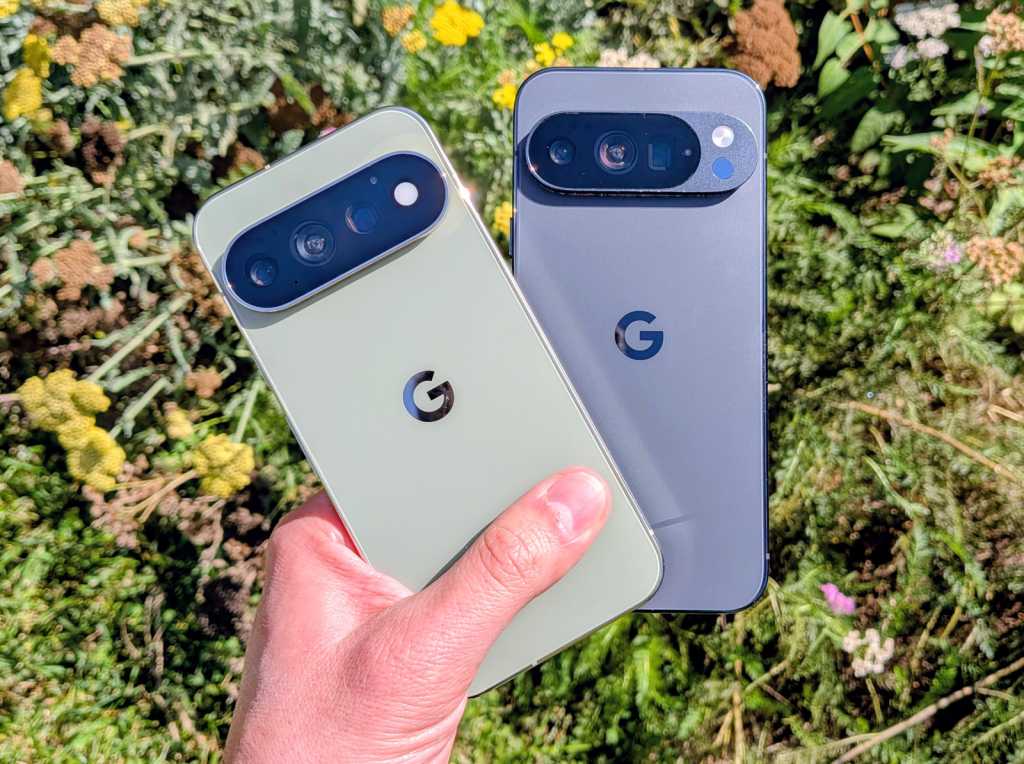
The Pixel 11 Pro in its Olive color atop my personal Pixel 10 Pro in Obsidian.
JR Raphael, Foundry
So when I moved myself into these latest Pixels and started carrying ’em in place of my now-standard 10 Pro device, I have all the perspective in the world to tell you that:
These devices are all positively delightful to use. They’re beautifully designed, sleek as can be, and a joy to carry and rely on.
That’s in part due to the hardware, which has gotten impressively polished (and also just plain purty) over the years, but it’s more because of the software and the uniquely pristine and bloat-free approach Google takes to its Android operating system. It’s a night-and-day contrast to the experience you see from Samsung and other Android device-makers, and the impact is extremely noticeable both in what the phones are like to use and in the lack of in-your-face ads and legitimate privacy worries that other Android approaches unfortunately include.
They’re also advantageous as a result of the genuinely useful and thoughtful touches Google adds into its native Android apps — like all of the smart Pixel Phone app features that let you avoid annoying hold times, skip over maddening phone mazes, intelligently screen calls and dodge spammy and scammy interruptions, and even enjoy clearer audio quality from regular ol’ audio conversations.
And that’s to say nothing, of course, of the Pixel’s unmatched software support policy. The Pixel is the only Android device where timely and reliable software updates — both major Android releases and the many smaller rollouts that now accompany those throughout the year — are an unambiguous part of the core product promise. With any Pixel phone, you’ll receive every software update within days of its release. No other device-maker even comes close to matching that guarantee, and for anyone who cares at all about maintaining optimal privacy and security practices on your phone over time, that’s a distinction you simply can’t ignore.
So that’s the first part of the Pixel 11 paradox — and that’s why these latest Pixels are all incredibly easy to recommend as the best all-around Android experiences available today and the only sensible suggestions for a top-tier Android purchase in 2026.
But there’s another half of the story, and it’s equally important.
The Pixel 11 upgrade uncertainty
Plain and simple, the most striking thing about these latest Pixels is how similar they are to their previous-gen Pixel 10 equivalents.
Now, don’t get me wrong: On paper, these latest Pixels are packin’ plenty of pertinent improvements. They’ve got new extra-efficient processors, brighter and supposedly more scratch-resistant displays, faster charging speeds, some new and improved camera components, and a thinner camera bar on the back. The Fold model is also ever-so-slightly thinner and lighter than its predecessor, by 0.7mm when folded (0.02″ — roughly half the thickness of a US dime) and 19g (roughly two-thirds of an ounce — the equivalent weight of three #2 pencils).
Speaking of the Fold, the 11 Pro Fold model is a true treat to use, and I still love its more familiar-phone-like form compared to the shorter and squatter, square-ish shape Samsung is now adopting ahead of Apple’s expected move in that same direction. The Pixel Fold’s dimensions allow you to feel like you’re using a regular phone most of the time, without much compromise or awkwardly limited screen space, and then enjoy that glorious tablet-like screen on the inside whenever you feel like unfolding it.
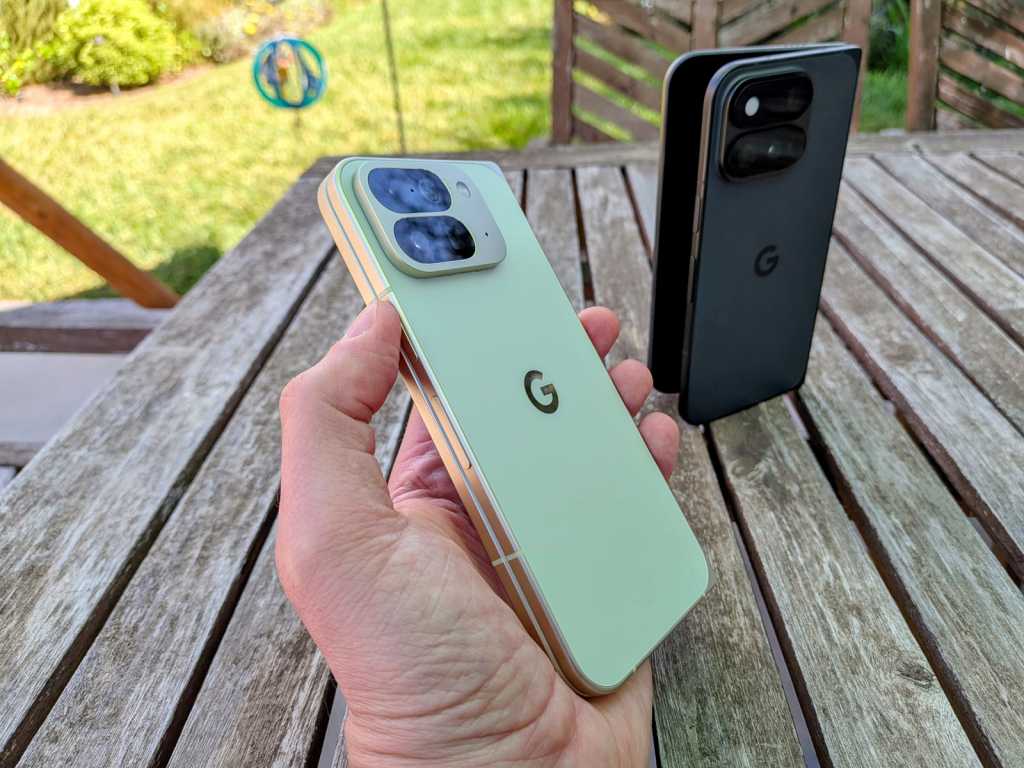
The Pixel 11 Pro Fold in my hand, with the 10 Pro Fold behind it.
JR Raphael, Foundry
Again: All of this works. Across the board, the Pixel 11 phones couldn’t possibly be more pleasant to hold, carry, and use. They’re fast, their photos are second to none, and they sport a couple of truly interesting new software features that you might actually appreciate — like a new Magic Capture camera mode that lets you tap one button to record a video and automatically get full-resolution photos of the most meaningful moments from within it and an enhanced Android voice typing system that works like Wispr Flow and makes dictation easier and more accurate than ever.
There’s also a new HiLight LED system on the Pro models’ backs that’s intriguing in theory but almost shockingly limited in implementation. Quite literally, all it does at the moment is light up when you’re talking to Gemini hands-free and light up with a custom color when one of your favorite contacts is calling.
The Pixel 11 Pro’s HiLight LED, visible here at the right side of the camera bar, lights up for Gemini — and not much more.
So as you can see, in and of themselves and in the big picture, the Pixel 11 phones all stand out and are exceptional. But when you start looking at them compared to last year’s models or even the Pixel 9 devices before that — well, things get a little more complicated.
In a week of using the different Pixel 11 phones, I couldn’t immediately detect or appreciate the presence of any of the aforementioned year-to-year improvements compared to the experience of using last year’s Pixel 10 models. The camera performance is still incredible, but looking at photos taken with the Pixel 11 Pro and Pixel 10 Pro (or any other 11-to-10 Pixel-to-Pixel comparison), the actual visible differences are subtle enough (and the previous model’s photos strong enough) that I suspect few people will spend much time thinking about them. As far as the processor goes, the phones feel zippy and as fast as can be right now, for sure — but, once more, I’d struggle to say they’re noticeably any faster, in real-world terms, than the models that came before them. And as far as the Fold is concerned, the form differences from last year’s device are so subtle that I think most people will be hard-pressed to be aware of the evolution.
The same photo taken seconds apart on the Pixel 11 Pro (left) and 10 Pro (right).
JR Raphael, Foundry
The Magic Capture mode is nice, meanwhile, but I’m not sure it’s a reason in and of itself for most folks to buy a new device if they’re already using a recent previous-gen Pixel — and it may well make its way to older Pixels eventually. The enhanced Android voice typing system might be a reason to upgrade — but (a) it’ll almost certainly come to the rest of the Android ecosystem before long, and (b) in the meantime, you can get almost the exact same experience in just a slightly less native-feeling and convenient way by installing Wispr Flow.
That aside, we can’t overlook two downgrades in the Pixel 11, compared to the 10 models: First, the Pixel 11 eliminates the thermometer that’s been present on the past few Pixel Pro models — something that was originally launched before it was ready but that evolved into a genuinely useful element. I can’t even count the number of times my wife or I have relied on it for taking a quick temperature when someone’s under the weather and a standalone thermometer can’t be found or is acting up and giving us a different reading every time we try it.
Second, and perhaps even more significant, the Pixel 11 Pro models start with 12GB of RAM and only bump back up to 16GB — the standard level of memory for all Pro models last year — if you opt for the pricier 512GB storage version. The reason for this change is seemingly an industry-wide issue that’s out of Google’s control, of course, but it’s still something you’re faced with as a potential purchaser of these products. (I’d be surprised if anyone detected an immediate discernible difference in experience as a result of this change, but it stands to reason that the limitation could adversely affect you at some point down the line — particularly if you’re doing a lot of multitasking or other resource-intensive work.) The Pixel 11 Pro Fold, meanwhile, maintains its 16GB RAM level but includes a $100 price hike from last year’s version.
So while the Pixel 11 phones are great phones in and of themselves, they aren’t exactly great upgrades if you’ve already got a Pixel 10 or arguably even a Pixel 9 equivalent in your person-paw. And because of that, most reviewers are gonna look at ’em and say, “Meh. These aren’t exciting.”
Here’s a little secret, though: Particularly for professionals, “exciting” isn’t everything. An exceptional all-around experience and the knowledge that your device will remain optimally up-to-date as far as security, privacy, and performance are concerned — for a full seven years, with these products — means more. And in a weird way, having these phones not feel like must-buy upgrades over the past couple models is actually an indication that those previous years’ products are doing their jobs well.
If you’re on an older-gen Pixel or thinking about making the leap to the land of Pixels for the first time, you can’t go wrong with any of Google’s new Pixel 11 options. They may not be exciting, exactly, compared to what came before ’em — but in an era where almost everything new is all about AI gimmicks for the sake of AI (and often at the expense of accuracy and quality), avoiding excitement and sticking to a setup that simply works well might be the smartest move you can make.
Don’t let yourself miss an ounce of Pixel magic. Sign up for my free Pixel Academy e-course and discover tons of hidden features and time-saving tricks for whatever Pixel you’re using right now!
This security-only release earns Patch Now for Windows, Office and Exchange; no SQL Server updates this month. Unfortunately, several critical issues affect server roles: Windows DNS Server carries a cluster of critical RCEs; Windows DHCP Server is the most-populated Microsoft product family at 14 entries. Testing should lead with printing and fonts and the Remote Desktop client, then a WinSock smoke test given the exploited afd.sys flaw. The Readiness team has provided a helpful infographic on the deployment risks for this Microsoft August update.
Known issues
Both August client and server-side updates ship with empty known-issues lists. This may change over the coming days so checking back to the Microsoft Security Update Guide (MSRC) may be prudent. July’s open items have all closed: the Dell/Intel driver hold, the mid-July WSUS sync degradation, and the Emoji Panel GIF outage (August swaps in GIPHY).
On the server side, WSUS synchronisation error details stay suppressed. The August Windows Server 2025 (KB5120233) and 2022 (KB5120242) updates still list this, the detail pane removed to address a remote code execution flaw CVE-2025-59287, with no published workaround.
One July item has been dropped from the documentation without a resolution note: the Windows Server 2022 BitLocker recovery prompt on first restart, for hosts carrying the PCR7 Group Policy condition. With no fix published, the Readiness team recommends that all recovery keys are (easily) retrievable before restarting freshly patched servers.
Major revisions and mitigations
Between the July and August Patch Tuesdays (15 July to 10 August), the MSRC Security Update Guide revised 534 CVEs. Almost all these changes (458) were routine Microsoft Edge and Chromium re-publications – none of which required customer action. That leaves 76 touching Microsoft’s own products, 60 of them flagged customer action required, including:
Windows storage and file system: four NTFS entries, all three July ReFS elevation-of-privilege flaws, and two Brokering File System fixes.
The Readiness team has reviewed the 751 published updates, and it appears that Microsoft has not published any mitigations for updates in this August release.
Windows lifecycle and enforcement updates
Microsoft has not published any service or enforcement deadlines for this August. The 13 October 2026 cluster stacks five migration tracks onto one date, with a second wave on 10 November; dates below come from the linked Microsoft lifecycle pages.
Microsoft’s August 2026 Patch Tuesday is a security-only release: 109 Windows test-guidance entries, four High Risk (July had 14). Printing and fonts lead: win32kfull.sys is the most-patched binary at seven entries and carries three of the four High Risk flags (32-bit printing on 64-bit Windows and font rendering); the Remote Desktop client carries the fourth. The testing guidance below works through each product and feature grouping.
Printing, fonts and graphics
Three of the four High Risk flags sit in win32k and touch print or font paths: 32-bit application printing on 64-bit Windows (two) and font rendering (one). GDI+, the Windows Imaging Component, and the kernel graphics driver (dxgkrnl.sys, five entries) change alongside; estates with 32-bit line-of-business printing or font-heavy documents take this first.
Print from your 32-bit applications to physical and virtual (PDF or XPS) printers, using text-heavy, graphics-heavy, and multi-page documents, and repeat after each relaunch, orientation, scaling, and resolution change.
Render varied fonts, sizes, and styles across browsers, Office, PDF viewers, and Notepad, and confirm Print Preview matches the printed page – watch for clipping, distortion, or missing glyphs.
Copy and paste images between Paint, Word, and Excel at different bit depths, and open EMF and TIFF files.
Exercise the graphics kernel: full-screen DirectX, multi-monitor hot-plug, resolution, HDR, and DPI changes, and sleep/resume.
Remote desktop and remote access
The RDP client carries the fourth High Risk flag; the fixes touch every redirection path and multi-session behaviour. RemoteApp, the display pipeline, and the RRAS and SSTP VPN stack change alongside.
Open several concurrent RDP sessions, enable printer, clipboard, audio, drive, and smart card redirection together, and exercise each across the sessions, confirming none interferes with another.
Disconnect and reconnect a session, confirm redirected devices and drives reattach, and test a RemoteApp end to end.
Configure a standard client VPN and an SSTP VPN over HTTPS and confirm sustained connections across reconnects and a restart.
Storage, file sharing and virtualization
The SMB client and server, NTFS and UDFS, the virtualised file layers (Cloud Files, Projected File System, Work Folders), and the platform stack (Hyper-V, virtual TPM, USB, and Windows Installer) all change. Standard Risk.
Connect to SMB shares (including RDMA, leases, and Continuous Availability), copy large sets both ways, and interrupt and reconnect a session; exercise NTFS extended attributes, UDF mounts, and cloud-file hydrate and dehydrate.
Create, checkpoint, and export a Generation 2 Hyper-V VM, enable a virtual TPM and BitLocker, and connect USB storage and MIDI devices.
Install, repair, and uninstall an MSI package, and confirm UAC elevation still prompts.
Telephony, networking and core services
TAPI is the busiest component (11 entries) but carries only parity fixes; the rest spans TCP/IP, HTTP.sys, Windows Firewall, Bluetooth, wired 802.1X, and message queuing. Broad and shallow.
Exercise TAPI line status and dialling locations against a shared line, and verify HTTP.sys under IIS over HTTP/1.1, HTTP/2, and HTTP/3.
Confirm TCP/IP IPsec tunnels on IPv4 and IPv6, toggle Windows Firewall rules across a restart, pair a Bluetooth headset, authenticate wired 802.1X, and validate MSMQ send and receive.
Office and SharePoint
This August patch cycle affects click-to-run (C2R), Microsoft 365 Apps, and MSI deployments of Microsoft Office with the following updates:
On MSI Office 2016, apply the client updates: Access (KB5002813), the ACE database engine (KB5002832), the Office proofing and UI components (KB5002791, KB5002795), Outlook (KB5002755), VBA (KB5002900), and Word (KB5002901), then exercise macros, external data, embedded objects, and line-of-business add-ins.
On SharePoint Server, patch 2016, 2019, and Subscription Edition, then check browser-based editing; mind the rollback rules – server updates cannot be uninstalled and always require a reboot.
Microsoft Exchange Server
On-premises Exchange takes a security update this month, seven CVEs across Exchange Server 2016, 2019, and Subscription Edition: one critical elevation of privilege and six important, spanning further elevation of privilege, remote code execution, denial of service, spoofing, and a security feature bypass.
Apply the update from an elevated command prompt: an un-elevated run leaves Exchange services partially patched and broken. Then confirm every Exchange service returns and that the server reports healthy.
Exercise mail flow end to end: send and receive internal and external mail, drain the transport queues, and check connectors and transport rules; confirm Outlook (MAPI over HTTP), Outlook on the web, and the Exchange admin centre for sign-in and core actions.
Confirm Autodiscover and free/busy resolve, test any hybrid connection to Exchange Online, and plan for the reboot the update requires – validate in a maintenance window before production.
Developer tools: .NET
The developer estate gets a broad, low-drama sweep; no SQL Server this month. Both the .NET Framework (Windows Server 2012 to Windows 11 26H1 and Server 2025) and the modern runtime and SDK patch, including WPF and WinForms.
Install the .NET Framework and modern .NET runtime and SDK updates, run a representative set of WPF, WinForms, web, and command-line applications, confirm normal behaviour, and build and run a .NET project to check for regressions.
The Readiness team recommends the following priorities for your larger enterprise deployments:
Start with printing and fonts: three of the four High Risk flags sit in win32k, so regress 32-bit printing, PDF and XPS export, font rendering, and Print Preview before anything else.
Take Remote Desktop next, the fourth High Risk flag, across the redirection paths, concurrent sessions, reconnects, RemoteApp, and SSTP VPN.
Give the busy but lower-risk areas a smoke pass: Telephony, the graphics kernel, DNS and DHCP, Active Directory, and the SMB stack.
Close out the rest: Office spans MSI 2016, SharePoint and Microsoft 365 Apps this month (Click-to-Run is in scope, unlike July), and .NET is a representative-application check.
Each month, we break down the update cycle into product families, as defined by Microsoft, with the following groupings.
Browsers
After July’s 46-strong Microsoft Edge (Chromium-based) haul, the browser family has nothing to report: August’s Security Update Guide carries no Edge-specific CVEs at all. It’s Margarita time – look busy or look elsewhere for patch-related testing and deployments.
Microsoft Windows
Windows carries the bulk again: 233 CVEs, 18 critical, the rest important bar one moderate. Elevation of privilege leads by volume (143 entries), but all but two of the 18 are rated as critical remote code execution vulnerabilities, on the network-facing server roles.
DHCP and DNS lead the critical-rated issues. Windows DHCP Server takes 14 CVEs, the busiest component by far, topped by a critical remote code execution flaw (CVE-2026-62823, “Exploitation More Likely”), with DHCP Client adding four more. Windows DNS Server is the headline RCE risk: six entries, four of them critical (CVE-2026-62878, CVE-2026-62817, CVE-2026-62820, CVE-2026-65789), reaching back to Server 2012. Patch the resolvers alongside the DHCP boxes.
A wider critical cluster. Beyond DNS, critical-rated issues also reach Microsoft QUIC, RRAS, the iSCSI Target Service, the WDS TFTP Server, the Remote Desktop Client, GDI+ graphics and Active Directory Certificate Services; domain controllers take priority, and Print Spooler and WSUS are for once absent.
Most-patched tally. DHCP Server leads (14, one critical), Win32k next (13 across two groupings), then the Telephony Service (11), the DNS client resolver (10), Windows Installer (nine), and the Windows Kernel and NTFS (eight each).
Add this Windows update to your Patch Now schedule, with your DHCP and DNS servers updated first.
Microsoft Office
Microsoft released 120 Office CVEs this month, 24 of them critical, remote code execution the through-line (62 entries). The packaging work sits on MSI Office 2016 and the SharePoint farms, but the exposure is overwhelmingly Click-to-Run: 89 of the 120 list Microsoft 365 Apps for Enterprise as affected, 20 of them critical, straight through the update channel.
Office clients – the critical RCE runs across Office, Word and Excel, mostly in document-rendering paths that fire on preview or open. The top-rated critical client entry, CVE-2026-70130, lists Microsoft 365 Apps among its affected builds, so Click-to-Run estates are squarely in scope rather than sitting this one out, as they could in July.
SharePoint Server – three critical-rated vulnerabilities on the on-premises farms, led by CVE-2026-65665, an RCE rated “Exploitation More Likely” (2019 and Subscription Edition), with two critical elevation-of-privilege entries behind it; a separate SharePoint Online spoofing flaw is fixed service-side.
Nothing in Office is exploited this month, but that critical SharePoint RCE and 20 Click-to-Run critical-rated vulnerabilities argue against waiting. Add the August Office and SharePoint updates to your Patch Now schedule.
Microsoft Exchange and SQL Server
Exchange Server has seven CVEs across Exchange Server 2016, 2019 and Subscription Edition, as four build-specific updates (KB5121573 through KB5121576). One is critical and six important; none is disclosed or exploited, but Exchange is internet-facing, so we would not wait.
Exchange Server (on-premises) – the critical entry is an elevation of privilege (CVE-2026-62911); the heaviest of the rest is a remote code execution (CVE-2026-62913). Apply it from an elevated command prompt and plan for the reboot (the test-guidance section covers mail-flow). Subscription Edition is the go-forward release; 2016 and 2019 still being carried is a reprieve, not grounds to defer migration.
SQL Server – nothing to install. On-premises SQL Server ships nothing; the only SQL-branded entries are cloud-side Azure SQL fixes, resolved service-side.
Add the on-premises Exchange update to your Patch Now schedule; SQL Server does not require anything this month.
Microsoft developer tools
Microsoft released 23 CVEs across its developer tooling this month, all rated as important: 13 in .NET and the .NET Framework, and 10 across Visual Studio Code and its Copilot extensions.
Microsoft .NET and .NET Framework – the runtime and framework are the focus this month, led by two remote code execution entries (CVE-2026-62897, .NET Framework, and CVE-2026-70354, .NET Core). The Framework rollups span Windows Server 2012 to Windows 11 26H1 and Server 2025; Visual Studio 2022 17.14 and 2026 18.8 take their exposure through the bundled runtime.
Visual Studio Code and Copilot – have three remote code execution entries and security feature bypasses across the Python extension, Copilot Chat and the core editor.
Add these developer-focused updates to your standard release schedule, behind this month’s Windows and Office priorities.
Adobe (and third-party updates)
Unusually, Adobe published an early-August emergency fix for a maximum-severity Adobe flaw (CVE-2026-48449), an incorrect authorisation that runs code with no user interaction. This makes this an Adobe “whatever you have installed” Patch Now moment due to how Adobe tends to share code between products. This August, there were two third-party flaws on Microsoft’s third-party list: the Trusted Computing Group’s TPM 2.0 reference-code bugs CVE-2026-6726 and CVE-2026-6727, both Important and issued by MITRE. If unpatched, a local attacker with TPM command access can work back to keys the chip should keep sealed, up to the RSA Endorsement Key behind device attestation. This completely defeats the purpose of the TPM chip – and, some would say, of migrating to Windows 11. Sorry, not sorry.
OpenAI has lost its AI ethics lead Chloé Bakalar just a year after she joined the company, the Financial Times reported. Bakalar has maintained a silence and has yet to update her LinkedIn profile, but if her departure is confirmed then it will add to the list of OpenAI executives who have quit in recent months.
Other departures include robotics chief Caitlin Kalinowski, who left the company over its deal with the US Department of Defense; researcher Zoe Hitzig, who quit in a very public way by writing an article in the New York Times; and Johannes Heidecke, head of safety systems.
The departure of its sole ethicist will add to the pressure on the company. In her year at OpenAI Bakalar focused on ethical approaches to model development, looking at how humans interact with AI and examining machine consciousness, according to the FT report.
Bakalar had considerable expertise in the area. She was previously at Meta, where she developed the company’s ethics programs, but has also held several positions at prestigious universities on both sides of the Atlantic. Her departure will cause some anxiety at OpenAI as it continues to prepare the ground for its IPO.
Customers of AI vendors in both countries may need to be wary about future cross-border acquisitions as the two superpowers jostle for a technological lead.