Month: August 2026

Microsoft brings Copilot apps together ahead of ‘super app’ overhaul

Microsoft will bring its two Copilot apps into a unified interface for consumer and work users, part of a wider drive to create a Copilot “super app” that consolidates various features.

Until now, Microsoft has offered two Copilot apps across web, desktop and mobile platforms: a simplified, consumer-focused Copilot app, and Microsoft 365 Copilot, which combines the AI assistant with access to Microsoft’s productivity apps and files. 

Microsoft on Thursday announced an “updated Copilot app” aimed at providing a “simpler, more cohesive experience” for personal and work users.  

For users of the consumer Copilot app, the update will provide access to Microsoft 365 tools such as Word, Excel, and Outlook from within Copilot, as well as the ability to connect email, calendars and cloud storage. At the same time, some features previously available in the consumer-focused app will be retired, including group chats and Deep Research, though Microsoft 365 Premium subscribers will still have access to a similar research tool called Researcher.

The changes mean consumer Copilot app users will be moved to an updated version of the app starting Aug. 18, with their history and most content carried across.

For Microsoft 365 Copilot work accounts, there’ll be minimal changes aside from a change to the app name and icon, Microsoft said. 

As the two apps are brought together, Microsoft said work and personal accounts will remain separate, with security and admin controls remaining in place when users are logged into their Microsoft 365 Copilot account at work:  

“Commercial data boundaries, tenant controls, and compliance protections are not changing,” the company said. “The boundaries that keep work and personal separate remain in place: Personal (Microsoft account) and work (Microsoft Entra) accounts are distinct by design. Data entered into the work (Microsoft Entra) experience does not flow into the personal (Microsoft account) experience, and vice versa.”

The changes can be viewed as part of a wider overhaul of Microsoft’s Copilot strategy, which centers around the introduction of a “super app” later this quarter. The plan — rumored for some time and recently confirmed by Microsoft CEO Satya Nadella in an earnings call — is to consolidate various Copilot features, including Copilot Cowork and “autopilot” agents into a single app. 

Microsoft has struggled to convince business customers to pay for the Microsoft 365 Copilot since it launched in 2023. The AI assistant costs $30 per user each month in addition to Microsoft 365 subscriptions for enterprises, and $20 per for user a month for smaller firms. (Microsoft does offer promotional discounts.)

Microsoft said earlier this year that it had 15 million paid seats, meaning that only 3.3% of Microsoft 365 customers pay for the tool. That figure has grown however, reaching 30 million paid seats as of last month, the company said. 

Apple cracks China with Alibaba for iPhone AI

Apple recently posted and removed details explaining how Mac users in China could set up their computers to work with Alibaba’s Qwen AI. Now, Reuters has confirmed long-held speculation that Apple has revisited its Google Gemini AI playbook and built its own proprietary AI model for China with support from Alibaba.  

Apple worked with a Chinese partner because US models such as ChatGPT or Claude are not being made available there, though Chinese AI development doesn’t seem to be held back by that lack. Apple and Alibaba have not commented on the claims, the report said.

The approach echoes Apple’s work with Google to build more advanced large language models (LLMs) for use with Apple Intelligence, and the news will likely be seen as broadly positive by Chinese iPhone users. They can now look forward to working with Apple Intelligence on their devices. The proximity of the reporting suggests they may be able to access Apple’s AI quite soon, once new Apple operating systems ship next month.

The silver lining

It’s also smart, as it means Apple has identified a way to introduce AI features in nations that are becoming protective of their tech stack.And while Apple’s work with Google on Apple Intelligence was widely regarded as signifying how far behind the company had grown on AI, the work it is now doing with Alibaba shows how the partnership approach has become a strategic tool. Basically, Apple found a way to use such development partnerships to navigate protectionism and political rivalry for the benefit of its customers.

The approach means Apple has the distinction of becoming the first foreign company approved to offer a proprietary AI model in China.

The work seems to have begun in February 2025, when Apple and Alibaba submitted co-developed AI features for approval to China’s Internet regulator, the Cyberspace Administration of China. Apple last month crossed a milestone in this work when the regulator finally registered Apple’s service. Apple will work with both Alibaba’s Qwen and tech from Baidu, previous reporting has claimed. It is not yet clear how the work with Baidu will be deployed.

This work supports US presence in China 

Delivering AI to Chinese customers is strategically vital to Apple. Its products are hugely popular among Chinese consumers and can arguably be seen as an expression of US soft power there. Any erosion of its position also erodes the US reputation in the economically vibrant market. 

AI, or the lack of it, has become a fulcrum for change. Morgan Stanley analyst Erik Woodring explained this last year, when he said: “Our survey work shows that Chinese iPhone users are not only more interested in access to genAI technology than US or European iPhone owners, but over 50% of Chinese iPhone owners cited the staggered rollout of Apple Intelligence as having a moderate to significant impact on their decision not to upgrade to a new iPhone this cycle.”

Apple is already struggling with these new competitive pressures. It has been encountering stiff competition from Huawei’s already AI-capable devices in China, with Huawei now the biggest-selling smartphone vendor there. 

Apple is also experiencing a seasonal slowdown in sales as shoppers wait on the introduction of the new iPhone Pro range. They expect powerful AI to be baked into the devices they select. “Increasing investment in agentic AI is becoming a competitive necessity rather than a differentiator,” Counterpoint warns.

Good for jobs

There’s also an impact on US employment. While Apple often faces criticism for having some of its assembly done in Asia, rather than the more expensive and inadequately resourced US, outgoing CEO Tim Cook recently explained that the company accounts for more than 400,000 jobs in the US. Many of those jobs are generated by the manufacturing of high-tech parts such as the protective glass used on iPhones.

While the significance may be easy to miss, this also means that any slowdown in device sales in the world’s second-largest economy — China — will also have a negative impact on US employment. Apple, meanwhile, continues to invest in improving US manufacturing skills and infrastructure. The company recently opened its Advanced Manufacturing Center in Houston in the presence of US Secretary of Commerce Howard Lutnick.

“With this Advanced Manufacturing Center, Apple will equip American workers with the skills they need to lead the next generation of technology,” Lutnick said.

Apple, meanwhile, is apparently planning toward introducing its much-anticipated folding iPhone Ultra device initially in America first.

Please join me on BlueSky,  LinkedIn, Mastodon and subscribe to The Core for your extensive, hand-curated Apple-related daily news fix.

DeepSeek raises some V4 prices by more than 10x as AI demand strains capacity

One of AI vendor DeepSeek’s biggest selling points has been its ultra-low price point, but that party’s about to end.

The Chinese model provider is raising API pricing for its V4 model family by notable margins, in some cases by more than 1,100%. The increases may not be that dramatic for all, though; the company is encouraging “more flexible workload scheduling,” with peak rates and half-price off-peak rates.

The news was tucked into the announcement of the general availability (GA) of DeepSeek V4-Pro and upgrades to VR-Flash. The new pricing takes effect for most parts of the world on August 16.

“On paper, at peak, against the right comparator, DeepSeek’s price advantage does disappear, and in places inverts,” said Sanchit Vir Gogia, chief analyst at Greyhound Research. But in practice, “the schedule’s own clock and cache hand most of it back to any buyer paying attention.”

How Flash and Pro compare now

The new API pricing structure is as follows:

  • Flash is now $0.22 per million input tokens (cache miss) and $0.66 per million output tokens off-peak; and $0.44 per million input tokens (cache miss) and $1.32 per million output tokens at peak.
    This is up from the flat rate of $0.14 for inputs (cache miss), representing a 57% to 214% increase, and $0.28 per million tokens for outputs, a 136% to 371% increase.
  •  Pro is now $0.66 per million input tokens (cache miss) and $1.98 per million output tokens off-peak; and $1.32 per million input tokens (cache miss) and $3.96 per million output tokens at peak.
    This represents an input increase of between 51% and 203% (up from $0.435) and output increase between 127% and 355% (up from $0.87).

Inputs with cache hits, when apps reuse stored prompts rather than processing similar requests from scratch, have even more dramatic pricing increases of 52% to 1,100%.

Mark Tauschek, VP of research fellowships and distinguished analyst at Info-Tech Research Group, pointed out that the increase does eliminate the price advantage that 4.0 Flash has over OpenAI 5.6 Luna at peak pricing, but not at off-peak pricing, as OpenAI has dropped Luna API pricing by 80%, off-peak.

It also doesn’t eliminate Deepseek 4.0 Pro’s price advantage over Terra, OpenAI’s GPT-5.6 mid-tier reasoning model, even at peak pricing, nor its advantage over GPT-5.6 Sol released in July, Tauschek said.

Greyhound Research’s Gogia noted that, off-peak, V4 Flash is “marginally more expensive” on input and 45% cheaper on output than Luna. Pro at peak, meanwhile, runs close to 5x Luna’s price on a representative coding-agent workload.

DeepSeek’s roughly 98% cache-hit discount, against an industry norm nearer to 90%, is the mechanism that has kept its measured cost per task at about 60% below Luna, even after Luna’s cost cut, he said.

“The schedule re-prices exactly that mechanism,” Gogia said. Flash’s edge over Luna decreases from roughly sevenfold to threefold off-peak, and 1.4 times at peak. “The cache is where the advantage genuinely erodes.”

Encouraging users to rethink their schedules

DeepSeek’s V4-Pro is now generally available, and V4-Flash is in beta. Both models have new flexible reasoning capabilities (low, high, max) and ‘thinking modes’ that use chain-of-thought (CoT) reasoning to improve answer accuracy. V4 Pro is now available on app, web, and via API, and users can try it using “Expert Mode.” V4 Flash is now in beta.

The general availability “completes a two-tier structure in which Flash serves volume and Pro is priced for complexity,” Gogia noted.

DeepSeek’s peak/off-peak pricing is a means to “allocate resources more reasonably,” the company said, to encourage users to “schedule their tasks based on actual usage.”

Gogia pointed out that with the new model, 17 of every 24 hours stay at half price, so timing becomes an economic variable, and work that can wait moves into the cheap hours. In fact, the new pricing schedule hits DeepSeek’s home market hardest and its export market lightest; Western buyers largely pay the off-peak rates.

“Usage is following economics at least as much as capability, and economics can change by schedule,” Gogia noted.

Simple supply and demand

Reading between the lines provides a more nuanced picture, Tauschek noted. “While it’s alarming to see the headlines saying DeepSeek is raising API pricing by 50%-1100%, it doesn’t really tell the whole story.”

Part of that story is demand, which is increasing exponentially. DeepSeek can’t keep up with compute requirements, and Anthropic also had a price increase for the same reason in April. And, while third-party providers have not yet reflected that trend, they’ll eventually have to, Tauschek said.

“This isn’t unexpected at all,” he noted. “It’s simple supply and demand: when demand goes up, pricing goes up, because supply becomes constrained.”

For enterprises that do use DeepSeek (many in the US do not, or can not), the new pricing is not likely to change anything, he said. Cost increases will mostly impact developers, but it will still be less expensive than most alternatives.

He pointed out that enterprises are adapting to model routing, which is critical for developers using agentic workloads. Just a few months ago, organizations were paying per-seat pricing and running up usage as a matter of course, but the market move to usage-based pricing has resulted in sticker shock akin to that of the early cloud days.

“Pricing will continue to be a big deal because CFOs are starting to ask what they’re getting for the massive AI spend,” Tauschek said.

DeepSeek pricing doesn’t change the need for compatibility, multi-modality

CIOs should read the schedule with “relief and unease,” Gogia noted. Relief because the bill is largely schedulable; unease because “a supplier that has learned to price the clock has learned something about its own leverage.”

Going forward, he predicted, Flash keeps the volume usage, Pro handles complexity, and interface compatibility lowers the cost of adoption and departure. The real question becomes whether lower economic floors, open weights, and compatible interfaces, when taken together with multi-model routing, make foundation model intelligence materially easier to substitute.

Capable inference can be produced “far below the price structures that once surrounded frontier AI,” Gogia noted, and open weights mean model developers become one of just several parties able to serve inference requirements. “The traditional software dependency changes shape when that happens,” he said.

The vendor still matters, as do capability and support, but once a workload can move between providers, and enterprises manage their own orchestration and governance, the vendor no longer owns the whole dependency, Gogia said.

The most lasting effect of DeepSeek is unlikely to be that it stayed cheapest, he noted. “It is that every provider must now explain why intelligence should command a premium once near-equivalent capability is available through several technical and commercial routes.”

This article originally appeared on InfoWorld.

DeepSeek raises some V4 prices by more than 10x as AI demand strains capacity

One of AI vendor DeepSeek’s biggest selling points has been its ultra-low price point, but that party’s about to end.

The Chinese model provider is raising API pricing for its V4 model family by notable margins, in some cases by more than 1,100%. The increases may not be that dramatic for all, though; the company is encouraging “more flexible workload scheduling,” with peak rates and half-price off-peak rates.

The news was tucked into the announcement of the general availability (GA) of DeepSeek V4-Pro and upgrades to VR-Flash. The new pricing takes effect for most parts of the world on August 16.

“On paper, at peak, against the right comparator, DeepSeek’s price advantage does disappear, and in places inverts,” said Sanchit Vir Gogia, chief analyst at Greyhound Research. But in practice, “the schedule’s own clock and cache hand most of it back to any buyer paying attention.”

How Flash and Pro compare now

The new API pricing structure is as follows:

  • Flash is now $0.22 per million input tokens (cache miss) and $0.66 per million output tokens off-peak; and $0.44 per million input tokens (cache miss) and $1.32 per million output tokens at peak.
    This is up from the flat rate of $0.14 for inputs (cache miss), representing a 57% to 214% increase, and $0.28 per million tokens for outputs, a 136% to 371% increase.
  •  Pro is now $0.66 per million input tokens (cache miss) and $1.98 per million output tokens off-peak; and $1.32 per million input tokens (cache miss) and $3.96 per million output tokens at peak.
    This represents an input increase of between 51% and 203% (up from $0.435) and output increase between 127% and 355% (up from $0.87).

Inputs with cache hits, when apps reuse stored prompts rather than processing similar requests from scratch, have even more dramatic pricing increases of 52% to 1,100%.

Mark Tauschek, VP of research fellowships and distinguished analyst at Info-Tech Research Group, pointed out that the increase does eliminate the price advantage that 4.0 Flash has over OpenAI 5.6 Luna at peak pricing, but not at off-peak pricing, as OpenAI has dropped Luna API pricing by 80%, off-peak.

It also doesn’t eliminate Deepseek 4.0 Pro’s price advantage over Terra, OpenAI’s GPT-5.6 mid-tier reasoning model, even at peak pricing, nor its advantage over GPT-5.6 Sol released in July, Tauschek said.

Greyhound Research’s Gogia noted that, off-peak, V4 Flash is “marginally more expensive” on input and 45% cheaper on output than Luna. Pro at peak, meanwhile, runs close to 5x Luna’s price on a representative coding-agent workload.

DeepSeek’s roughly 98% cache-hit discount, against an industry norm nearer to 90%, is the mechanism that has kept its measured cost per task at about 60% below Luna, even after Luna’s cost cut, he said.

“The schedule re-prices exactly that mechanism,” Gogia said. Flash’s edge over Luna decreases from roughly sevenfold to threefold off-peak, and 1.4 times at peak. “The cache is where the advantage genuinely erodes.”

Encouraging users to rethink their schedules

DeepSeek’s V4-Pro is now generally available, and V4-Flash is in beta. Both models have new flexible reasoning capabilities (low, high, max) and ‘thinking modes’ that use chain-of-thought (CoT) reasoning to improve answer accuracy. V4 Pro is now available on app, web, and via API, and users can try it using “Expert Mode.” V4 Flash is now in beta.

The general availability “completes a two-tier structure in which Flash serves volume and Pro is priced for complexity,” Gogia noted.

DeepSeek’s peak/off-peak pricing is a means to “allocate resources more reasonably,” the company said, to encourage users to “schedule their tasks based on actual usage.”

Gogia pointed out that with the new model, 17 of every 24 hours stay at half price, so timing becomes an economic variable, and work that can wait moves into the cheap hours. In fact, the new pricing schedule hits DeepSeek’s home market hardest and its export market lightest; Western buyers largely pay the off-peak rates.

“Usage is following economics at least as much as capability, and economics can change by schedule,” Gogia noted.

Simple supply and demand

Reading between the lines provides a more nuanced picture, Tauschek noted. “While it’s alarming to see the headlines saying DeepSeek is raising API pricing by 50%-1100%, it doesn’t really tell the whole story.”

Part of that story is demand, which is increasing exponentially. DeepSeek can’t keep up with compute requirements, and Anthropic also had a price increase for the same reason in April. And, while third-party providers have not yet reflected that trend, they’ll eventually have to, Tauschek said.

“This isn’t unexpected at all,” he noted. “It’s simple supply and demand: when demand goes up, pricing goes up, because supply becomes constrained.”

For enterprises that do use DeepSeek (many in the US do not, or can not), the new pricing is not likely to change anything, he said. Cost increases will mostly impact developers, but it will still be less expensive than most alternatives.

He pointed out that enterprises are adapting to model routing, which is critical for developers using agentic workloads. Just a few months ago, organizations were paying per-seat pricing and running up usage as a matter of course, but the market move to usage-based pricing has resulted in sticker shock akin to that of the early cloud days.

“Pricing will continue to be a big deal because CFOs are starting to ask what they’re getting for the massive AI spend,” Tauschek said.

DeepSeek pricing doesn’t change the need for compatibility, multi-modality

CIOs should read the schedule with “relief and unease,” Gogia noted. Relief because the bill is largely schedulable; unease because “a supplier that has learned to price the clock has learned something about its own leverage.”

Going forward, he predicted, Flash keeps the volume usage, Pro handles complexity, and interface compatibility lowers the cost of adoption and departure. The real question becomes whether lower economic floors, open weights, and compatible interfaces, when taken together with multi-model routing, make foundation model intelligence materially easier to substitute.

Capable inference can be produced “far below the price structures that once surrounded frontier AI,” Gogia noted, and open weights mean model developers become one of just several parties able to serve inference requirements. “The traditional software dependency changes shape when that happens,” he said.

The vendor still matters, as do capability and support, but once a workload can move between providers, and enterprises manage their own orchestration and governance, the vendor no longer owns the whole dependency, Gogia said.

The most lasting effect of DeepSeek is unlikely to be that it stayed cheapest, he noted. “It is that every provider must now explain why intelligence should command a premium once near-equivalent capability is available through several technical and commercial routes.”

This article originally appeared on InfoWorld.

How Apple is leaving money on the table

Apple now has a long and storied history in wearables. The Apple Watch set expectations for the category, replacing Swiss watches on so many wrists on its journey to become the world’s most widely worn wearable AI device. But is Apple making the most of the technology it has now developed — and is there another opportunity waiting to be explored?

Apple seems to think there might be. Mark Gurman recently reported the company is exploring a wider family of wearables, including products such as fitness bands and rings. And while the latter certainly represents a viable opportunity, the fitness band market seems ripe for a good bit of Sherlocking.

Why is it ripe? 

The technologies Apple already has

First, think of the technologies Apple can already bring to a fitness band product. The sensors, algorithms, and software the company has already developed would certainly make sense in wristband form when used with a paired iPhone to review the data the band collects. Apple’s sensors have a good reputation for accuracy and could deliver outstanding battery life. They could carry a smaller display to show limited amounts of information, such as time or distance travelled. And I expect the company’s product design teams could build a high-quality health and fitness band with very little effort, as some of the key technologies to support such a device have already been tried and tested on Apple Watch.

Privacy as a product

The second reason is competitive. Apple knows that in Europe under the Digital Markets Act it will eventually be forced to give third-party devices, including fitness bands, peer access to the kind of data it already uses in the Apple Watch. The company has suggested a protected system in which that information is shared (once it has been cleaned up to protect customer privacy), but EU regulators have not yet agreed – and perhaps never will.

The problem at the moment is that Apple doesn’t make a fitness band other than Apple Watch. And there are enough Apple customers who use third-party bands that the company might see an opportunity to bring its own versionto market as a fitness band that doesn’t erode privacy. Ironically, EU competition regulators have given Apple a reason to compete for a market it didn’t originally want to get into — to the likely detriment of incumbents in the fitness band space.

What customers want

The third reason is the nature of the market itself. Recent success by the likes of Fitbit Air, Cirqa, or Whoop show growing interest among consumers for screen-free, all-day trackers. 

“Consumers want either minimalist, screenless trackers they can wear 24/7 or feature-rich sports watches with superior accuracy and multi-day battery life,” Jason Low, research director at Omdia said in a statement. “Premium and screenless devices are gaining ground, while basic watches and mid-tier smartwatches are being left behind.”

Apple leads the smartwatch side of the equation with a 46% global share, Omdia says, while Garmin (with 15%) posted the biggest share gain among non-Apple vendors. “Garmin’s market share gains highlight a clear trend: consumers are increasingly willing to pay premium prices for devices that deliver accurate, advanced training data and translate it into actionable insights,” Low said. 

What Apple offers

Apple already has its own market-tested technology to provide accurate and advanced fitness monitoring if provided on a screenless device. As its business is not built on selling the data its devices gather, it can supplement those high-quality features with privacy promises some other vendors don’t match, while offering additional features and services through integration at a platform level. Add Siri AI to the mix and access to Apple Music and the device seems even more compelling.

Apple might be motivated to boost attachment rates to customers who will update iPhones, Macs and other Apple devices less frequently in response to recent price increases. The logic is that if customers can’t afford a new iPhone, they might invest in an Apple Watch, AirPods, or fitness band instead, becoming more deeply invested in Apple’s ecosystem as they do.

The potential returns seem promising: the fitness tracker market is expected to $generate 189 billion by 2032. That’s real money Apple already has the tech to take a grab at – and its years of work on colorful Apple Watch bands means it could offer its bands in a wide selection of designs at a price consumers will find they can afford.

You can follow me on social media! Join me on BlueSky,  LinkedIn, Mastodon and subscribe to The Core.

Adobe now lets Workfront users assign tasks to AI agents

With the launch today of the AI Collaborators feature in Workfront, Adobe aims to bring AI agents directly into the flow of work as permissioned team members that can be assigned tasks.

Three types of these ‘collaborators’ are now generally available in Workfront. A content reviewer agent automatically checks documents in the work management app against brand guidelines. A project coordinator tracks project progress and keeps stakeholders up to date. 

Then there are “task agents” that let customers connect external AI agents to Workfront and assign them work.

The task agents are geared towards a variety of purposes — a social media manager that turns briefs into published posts, a performance analyst that reports on how campaigns are faring, or a content designer that creates visuals and layouts.

To set up a task agent, users provide a name and description of the agent’s purpose, then connect it to an agent platform, with Anthropic’s Claude, Microsoft’s Copilot Studio, and Writer currently highlighted as options. 

Once it’s ready to go, users can assign work to the agent in a Workfront project just as they would a human user. 

As the agent carries out its tasks, an auditable trail of actions is recorded via the Workfront “update stream.” That allows humans to review outputs, such as AI-generated copy, and approve or adapt the result as needed.

Only admins are permitted to create AI Collaborators within Workfront. 

With the launch of AI Collaborators in Workfront, Adobe’s intention is to deploy AI agents where work actually occurs, said Brent Rudewick, vice president for strategy and product management for Adobe GenStudio and Workfront. That, in turn, can help customers shift AI investments from proof of concept to production. 

“The challenge we were solving is: how do we bring an agent into the context of the workflow as an authorized, permissioned user?” said Rudewick. “That’s what an AI Collaborator is.”

In many cases, employees might already use their own AI agents — be that ChatGPT, Claude, Copilot, or other tools. But those agents are removed from important information relating to work tasks, said Rudewick. 

“Workfront already has all that context because it’s got the previous briefs you’ve done, the previous content, and it understands the knowledge graph of how that stuff works,” he said. “You’re bringing that agent into a system that already has all of the context: it knows what it needs to go and do, instead of you having to tell it every time you go into one of those other surfaces.”

“This is a step in Adobe’s evolution of AI and automation capabilities,” said Jessica Liu, principal analyst at Forrester. “It follows in the direction of the overall technology market.” 

Marketers are looking to automation to gain efficiency, she said, though effectiveness is “unfortunately more of an afterthought at the moment.” 

Any automation benefits will depend on organizations having well-designed processes and workflows, Liu said. “Technology that can support marketers in those efforts is helpful, but only if marketers can help themselves first,” she said. “Specifically, they need to have processes and workflows that are diagnosed, scoped, designed, implemented, and optimized. It’s very difficult to automate a process or workflow that is broken or non-existent.”

At the same time, Adobe wants to make it easier for Workfront users to access the feature from third-party AI agent tools via a model context protocol (MCP) client. At launch, this enables users to take actions such as creating a campaign record, assigning work, approving content and more from ChatGPT, Claude, Copilot and others.  

“We want to give choice to the customer,” said Rudewick. “If the enterprise has decided, ‘Hey, Claude is the predominant surface we’re going to use,’ we want them to be able to use that surface and not be blocked to get the value that they have in their application investment in Workfront.

“If you boil Workfront down to its most rudimentary sense, it’s a campaign, it’s a project, it’s a task, it’s an assignment, and it’s an approval — that’s really what Workfront is, so how do we expose that through whatever surface?”

The emergence of AI tools that can perform tasks on behalf of users has been viewed as a threat to software companies such as Adobe. But even as Adobe opens Workfront up to third-party AI platforms, Liu believes the company’s AI investments can help ensure customers remain in the Adobe app. 

“For marketers who use many Adobe products, having Workfront AI Collaborators operate within Adobe’s ecosystem should be easier for data transfer, access management, and user interface and experience,” said Liu.

AI Collaborators are available at no additional cost to Workfront customers (Adobe does not publish Workfront prices). However, using the “task agent” AI Collaborator could incur additional costs for third-party agents that connect to Workfront.

It took $58 to break Microsoft’s SCCM, but a patch made it harder

Researchers at XM Cyber found that a standard domain user with no Microsoft SCCM privileges can chain multiple flaws to reach remote code execution, although the attack does require network access to the SCCM environment.

Enterprises use Microsoft System Center Configuration Manager (SCCM) to deploy operating systems, manage patches, distribute software, and monitor compliance across large Windows fleets. XM Cyber’s attack can move from an ordinary domain account to code execution as “NT AUTHORITY\SYSTEM” on the primary site server.

“After the Site Server is compromised, all of its managed clients are compromised as well, which usually means taking over all the company assets,” XM Cyber’s Omri Baso told CSO.

The revealed attack chain combines four weaknesses, including a broken authorization in the AdminService upload functionality, a path-traversal flaw dubbed “CabSlip,” weak code-signing validation that could be tricked with a $58 commercial certificate, and an unsigned DLL-loading path in the SMS Executive service.

Microsoft fixed the initial authorization flaw, tracked as CVE-2026-47301, in July, but Baso said the remaining links in the chain are not expected to be fully addressed until ConfigMgr 2609, planned for October.

The patch did not patch

The initial foothold comes from SCCM’s AdminService API. Its normal extension-upload endpoint checks whether a user has the required permission, but its “chunked-upload” counterpart does not. That allows an authenticated Active Directory user to submit a malicious CAB archive without SCCM administrative privileges.

Microsoft’s July fix blocks that route for standard domain users. However, the downstream chain remains reachable through another path. Users assigned the built-in Operations Administrator role, or a custom role with Create permission on “SMS_ConsoleExtensionData,” can still trigger the same sequence.

But there is an important qualification here. XM Cyber said it believes organizations are unlikely to be exposed through the Operations Administrator route because it is already a highly privileged role.

Once the CAB reaches the server, CabSlip allows files to escape the intended temporary extraction directory and be written elsewhere on the filesystem. The attacker can use this arbitrary file-write capability to replace “adsource.dll,” a secondary library loaded by the SYSTEM-level SMS Executive service without its own signature check.

When the service subsequently loads the DLL, the attacker gets code execution as SYSTEM.

A $58 certificate can cross the trust boundary

The chain becomes particularly notable because SCCM’s signature validation does not establish that the signing certificate belongs to Microsoft or the target organization. It checks that the signature is structurally valid and non-expired, while revocation checks are disabled.

That means an attacker does not need an enterprise certificate. XM Cyber said the attack depends on a code-signing certificate and can also abuse certificates leaked online. For his own research, Baso used a Certum Open Source Developer Certificate that cost about $58.

For defenders, XM Cyber recommends restricting network access to the AdminService API and auditing SCCM RBAC assignments, particularly accounts with the Operations Administrator role or equivalent Create permissions.

Teams should also monitor the Site Server’s “AdminService.log” for a “System.IO.DirectoryNotFoundException” followed by an HTTP 500 response, a pattern that can indicate the path traversal was triggered, XM Cyber added.

Unexpected modifications to adsource.dll in the Configuration Manager installation directory can provide another detection signal.

Microsoft is reportedly working on patches for the remaining flaws. It did not immediately respond to CSO’s request for comment.

The article originally appeared on CSO.

Pixel 11 envy? Here’s how to unlock its best new feature on any Android device

Have you heard? It’s that time of year again — time for some snazzy new Pixels to tempt our gadget-coveting “gimme!” reflexes and guide flagship Android phone expectations for months to come.

Google’s latest and greatest gizmo is the Pixel 11 series, which includes the regular Pixel 11 and Pixel 11 Pro alongside the plus-sized Pixel 11 XL and Pixel 11 Pro XL and the fancy new folding Pixel 11 Pro Fold model (gesundheit!). El Googaloo took the wraps off all those new devices on Wednesday and has ’em all available for preorder now, with prices starting at $899 (regular Pixel 11), $1,099 (Pixel 11 Pro), and $1,299 (Pixel 11 Pro Fold).

At first glance, this year’s Pixel models might not seem like the most exciting upgrades from last year’s Pixel 10 products. They bring plenty of significant refinements to an already successful formula, with some welcome ticks forward — like better cameras, brighter and more scratch-resistant displays, faster charging speeds, and an updated processor that supposedly leads to speedier and more efficient performance. And, of course, there’s more Gemini everywhere (for better or for worse, depending on your perspective). But impressive as it all may be, it’s mostly iterative improvements over the previous-gen Pixels — which isn’t necessarily a bad thing but also isn’t exactly awe-inspiring, at least on the surface.

The most eye-catching addition to the Pixel 11 series is, rather ironically, a callback from Android’s past. It’s something Google’s calling HiLight, and it’s basically a new series of LED lights built into the freshly thinned-down camera bar on the phones’ backs. The lights illuminate to alert you to different events, allowing you to know about important incoming info at a glance — without having to so much as even look at your screen.

If the concept feels familiar, it should: Early Android devices boasted a similar sort of LED notification light for a very similar purpose. They were less visually striking, but they served the same basic purpose — up until they went out of favor for the far more complex (and, some might argue, less effective) always-on display concept that followed.

Here’s a little secret, though: You don’t have to have a new Pixel 11 phone in front of you to enjoy a similar sort of distraction-reducing, awareness-enhancing sorcery. You can actually recreate the Pixel 11 HiLight glow effect on any Android device this instant — and do it in a way that’s much more versatile, functional, and all-around useful, to boot.

Lemme show ya how.

[Get next-level knowledge in your inbox with my free Android Intelligence newsletter. One new and useful tip every Friday!]

The lowdown on Pixel 11 HiLight

First things first, a quick hit of context about the Pixel 11 HiLight system and how it actually works.

As of the phones’ launch, HiLight is active only when the device is face down on a surface — perhaps not surprisingly, given that the lights live on the device’s back — and it works only in two super-specific scenarios:

  1. When you’re in the midst of getting an incoming call from a favorite contact, the Pixel 11 HiLight indicator glows with a custom color so you can see who’s calling and know it’s important. (It works with both the Pixel Phone app and WhatsApp, to start.)
  2. When you’re interacting with Gemini, HiLight pulses to let you know the system is listening, thinking, and responding.

Aaaaaaaand, that’s it. The system doesn’t work with any other apps, according to Google, and it doesn’t interact with notifications in general to let you know about important pending activity beyond those incoming calls.

It’s actually quite limited, in other words. And no matter what Android phone you’re using — even if it ends up being a Pixel 11! — you can take the same classic concept and make it infinitely more valuable.

The trick revolves around a handy little power-user app called AodNotify. The app has a few different versions, depending on which specific type of Android device is in your paw right now:

Whichever version you end up with, AodNotify essentially creates your own custom notification light within your Android phone’s screen — by lighting up the area around your camera cutout at the top of the display, or alternatively creating a border-outline light that goes all the way around the phone front’s perimeter. And it shows up both when the screen is on and when it’s off.

Android notification light: AodNotify
AodNotify puts a Pixel-11-HiLight-style notification light right on any Android device’s display.

JR Raphael, Foundry

It serves the same basic purpose as the Pixel 11 HiLight (as well as the old-school 2008-era Android phone LED notification lights that preceded it), but with some key advantages:

  • You can see it when your phone is face-up — the way most folks seem to set their devices down when they aren’t actively in use.
  • As a result, you can see it when your screen is on and you’re actively using the device as well as when the display is off, as mentioned a moment ago.
  • You can have it light up to alert you of any manner of incoming call or notification with the same sort of simple at-a-glance recognition.
  • And you can control exactly how and when it works, down to the tiniest of preferences, to make it perfectly useful for you.

Compared to HiLight, the practical value of this approach is absolutely bonkers. Rather than just letting you know about important incoming calls when your phone is face down, AodNotify lets you see at a glance exactly what type of notifications are waiting for you at any given moment — without having to so much as pick up your phone or process any intricate on-screen info.

Whatever alert it flashes can stay present and visible for any amount of time, too, so whether you hear a ding and want to glance to see what’s up or even if you miss the audio alert entirely (or have it disabled deliberately) and want to sneak a peek at your screen to know in a split second what’s waiting for you, AodNotify will get the job done.

And it’s surprisingly easy to set up, too — with two to three minutes of one-time configuration that you’ll never have to think about again.

Your own Android HiLight equivalent

All right — ready? First things first, go install AodNotify from the Play Store, using whichever link is appropriate for your current Android device from above.

Once the app is ready, open ‘er up and follow the prompts to get it going and grant it all the forms of access it needs to operate:

  • First, you’ll select which apps can activate your new notification light and cause it to illuminate. If you want any and all notifications to be included, tap the “All” option at the top of the list. If you want to cherrypick and select only certain especially important apps while leaving others off, you can just choose whichever apps you’d like to have included.
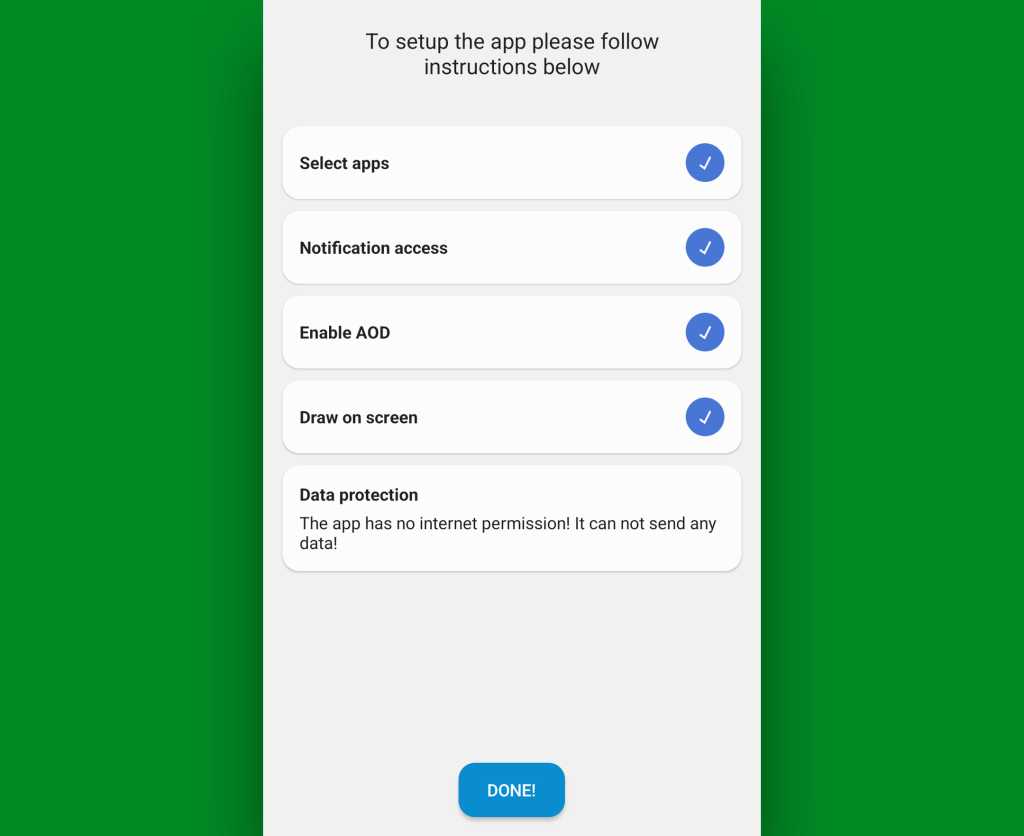
  • Next, tap the lines for “Notification access,” “Enable AOD,” and “Draw on screen,” if needed, and follow the prompts to enable AodNotify and/or the necessary option for each of the associated areas. This may seem like a lot of access, but AodNotify genuinely needs it to do what it does — and, critically, the app doesn’t require any other system-level permissions, including even access to the internet, so it couldn’t possibly do anything with your data (and its privacy policy is clear about the fact that it doesn’t collect or share any manner of data, ever). It’s also by a known and long-standing reputable Android developer.
  • After that, you’ll see a pop-up prompting you to consider the app’s Pro version — which runs five bucks a year or $7 for a single one-time purchase. The Pro path turns off some ads in the AodNotify setup interface and enables some extra features. You may or may not want to consider it eventually, but for now, just hit the “x” in the upper-right corner of that prompt to dismiss it and move on.
Android notification light: AodNotify setup
AodNotify’s initial setup takes roughly two to three minutes to get through.

JR Raphael, Foundry

Now for the fun part: At the app’s main setup screen, make sure the toggles next to “Notifications” and “Notification light” are active — then tap into each of those sections along with “Colors” and “General” to explore all of the available options.

Of particular note:

  • Under “Notifications,” the “Battery” section lets you activate a special notification light for anytime your phone is charging, fully charging, or with a low (less than 15%) battery — so you can always be aware of that info when it arises.
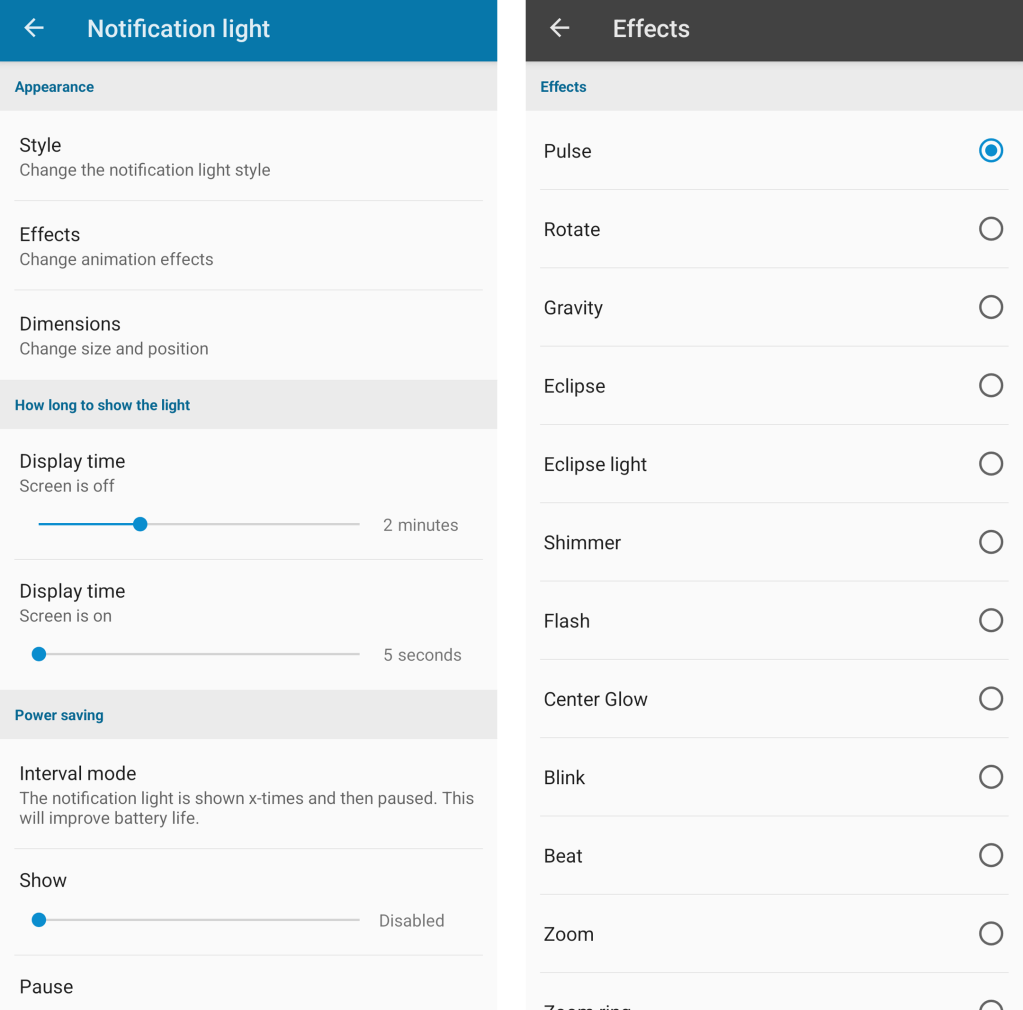
  • Under “Notification light,” the “Style” selector will let you shift your spiffy new light from its default camera-cutout-outline position to a full-screen outline or a classic-Android dot-in-the-corner LED-type effect.
  • “Effects” in that same section will let you change the light from a simple pulse to all sorts of other interesting light-up patterns.
  • “Dimensions” will let you shift the exact size, shape, and placement of the light, if it doesn’t look quite right on your screen.
  • And the “How long to show the light” subsection will let you adjust how long any active notification light remains present, both when your screen is on and when the display is dark.
Android notification light: AodNotify settings
You’ll find all sorts of interesting settings for controlling how your custom notification light works.

JR Raphael, Foundry

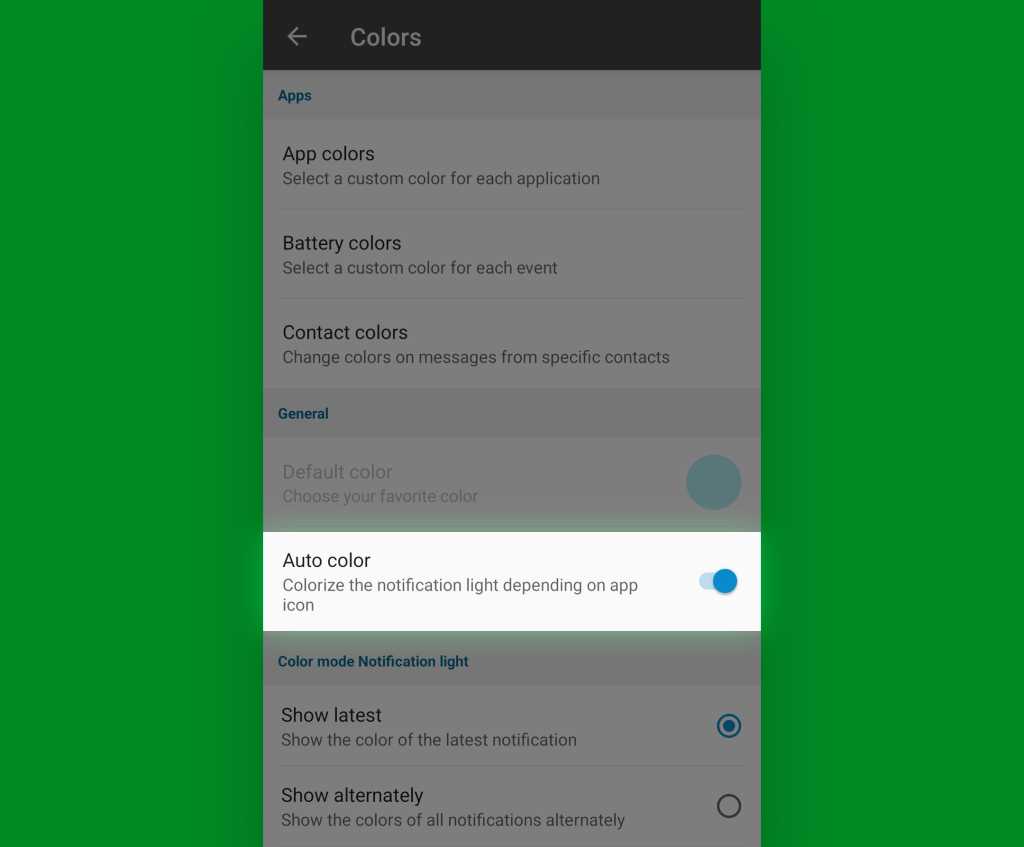
Beyond all of that, some of AodNotify’s most helpful options are in its “Colors” settings section. There, you can specify different distinctive colors for messages or calls connected to different contacts, so you can see who is calling or texting you just by the color of the light (much like what the Pixel 11 HiLight feature does, only with a much broader and more sensible scope). And you can activate an off-by-default option to have your notification light automatically change its color to match the primary hue associated with any given app’s icon — which is a nifty way to know at a glance that a pending alert is coming from, say, your Calendar app or Slack.

Android notification light: AodNotify auto-color
AodNotify’s “Auto color” option is one of the app’s most powerful — and easily overlooked — features.

JR Raphael, Foundry

And that’s pretty much it. Your Pixel-11-style HiLight upgrade is officially complete — with an even more useful productivity-boosting framework than what the Pixel 11 HiLight version provides.

That’s the power of Android for ya. And it’s a power that’s present no matter what device is in front of you or how long you’ve been holding it.

Never miss a moment of Android awesomeness with my free Android Intelligence newsletter. One new exceptional tip in your inbox every Friday — straight from me to ye.