Month: September 2026

A look inside Apple’s relationships with Intel and TSMC

Former Apple chip supplier Intel has faced a lot of challenges since Apple ceased to be a client. It struggled to win back some of Apple’s processor manufacturing business, but seems to face one fundamental challenge — trust.

That’s the very briefest gist of an extensive and outstanding report today from Culpium, which gives us an insider look at the relationship between the firms. It’s particularly relevant, given that the Trump Administration has announced that Apple agreed to work with Intel in the future. (TSMC is Apple’s current supplier and that relationship seems very solid.)

The root of the challenge

The problem with Intel, according to the report, is that a lack of trust drove Apple to seek an alternative processor supplier in the first place. The report discusses some of those challenges, including Intel’s failure to keep the pace with Mac chips, which is why the M1 chip astonished the industry, because it gave Apple the performance it had always sought.

How we got here

The root of that release was mobile, of course. Apple’s A-series chips were built for mobile and eventually transcended to become M-series Mac chips. Intel turned Steve Jobs down when he asked it to make mobile processors, pushing Apple to TSMC. The history is more complex than that, of course — Apple also acquired chip development expertise from PA Semi, for instance — and established a foundry deal with TSMC that meant the company produced Apple-designed chips. The work Apple did on mobile processors eventually enabled the move to Apple Silicon.

That’s the history. Fast forward to today and an ailing Intel needed new client wins even as the Trump Administration sought to support onshore processor production; it’s a strategic need for the US. The problem is, as Culpium terms it, that Intel isn’t willing to build manufacturing capacity until it wins the supply contract. And Apple needs a much firmer promise than that to supply its huge mass market. It needs capacity before it can provide trust.

Telling tales too soon?

During the most recent negotiations concerning Intel’s capacity to deliver chips in quantity, the report tells us Intel somehow managed to challenge that trust by telling third-party partners that it had secured Apple as a client. Anyone who knows Apple will recognize that the company doesn’t like its business discussed that way. “A sure sign that the two companies may be on the path to some serious cultural clashes,” wrote Culpium.

TSMC, meanwhile, has a corporate commitment to trust, a promise recognized across the industry — even by Nvidia founder Jensen Huang. That trust extends into tomorrow, which is why TSMC invests vast sums in developing process technology it believes customers will need tomorrow, rather than waiting for them to order up capacity today. That’s also why TSMC today offers some of the world’s most advanced interconnects, enabling powerful tech that likely includes Apple’s M5 Ultra. But just as important as technology and manufacturing capacity is a trusted relationship between companies. 

That’s not to say capacity doesn’t matter. It does. And as Apple continues to sell its products in ever greater quantities, it knows it must source additional supply; that’s why it speaks to Intel, Samsung, or even CXMT about the components its products require. But ultimately, a company that historically has felt let down by numerous key competitors — think Google, Samsung, and Android or, more recently, elements of OpenAI — will place a great deal of value in discretion and corporate trust.

After all, Apple has learned that in the ultra-competitive market in which it exists, what some call paranoia will in the end be seen as business sense.

You can follow me on social media! Join me on BlueSky,  LinkedIn, Mastodon and subscribe to The Core.

The ultimate Chrome keyboard shortcut upgrade

When it comes to productivity these days, we’re got two competing concepts to consider:

  1. Automate everything with AI and let an unreliable, error-prone bot do work on your behalf (thus likely spending even more time reviewing — and correcting — its mistakes)
  2. Find intelligent systems for increasing your own efficiency while maintaining complete control over what you’re doing

The first path clearly gets the most attention as of late. (And, to be fair, there are ways that AI can genuinely be useful, especially when it’s used as a tool for specific limited purposes as opposed to an omnipresent answer for everything.) But arming yourself with good old-fashioned efficiency-enhancers is an increasingly underrated and overlooked option for giving yourself a powerful productivity advantage — in a way that actually makes a difference, without any awkward compromises.

That’s particularly true in the domain of the desktop browser, where so many of us do so much of our work in 2026. The browser in many ways has become our de facto workday operating system — no matter what kind of computer we’re using at any given moment — and yet, it’s nowhere near the level of an actual operating system when it comes to the shortcuts and work management tools it offers.

At this point, the company behind the world’s most widely used browser is seemingly more interested in finding new places to cram Gemini into our lives than developing genuinely useful systems for more efficient browser work. But a third-party developer we’ve talked about before in these quarters is stepping up to fill that void and give Chrome the keyboard-centric kick-in-the-keister it needs to become an optimal productivity backdrop — with our own fleshly fingers guiding the way.

It’s a brand new browser extension that’ll work in any Chromium-based browser and completely change how you think about getting around your tabs and getting stuff accomplished. I’ve had the opportunity to test it out and live with it for several weeks now. Let me show you how it works and what it could do for you.

[Get level-headed knowledge in your inbox with my free Android Intelligence newsletter. One smart new thing to try every Friday!]

Meet your new Chrome command center

My fellow keyboard warrior, allow me to introduce you to a little something called Tab-da.

Tab-da is an extension for Chrome — or, again, any other browser based on the same underlying code, including Vivaldi, Edge, Brave, and Opera — that adds all sorts of keyboard-oriented productivity-minded power-ups into your browser environment.

There’s so much to it, in fact, that the biggest challenge is wrapping your head around all of the possibilities it presents and developing the muscle memory to get yourself in the habit of using actually ’em.

The best way to get going is to start small — with a focus on a few core Tab-da features:

1. The tab switcher

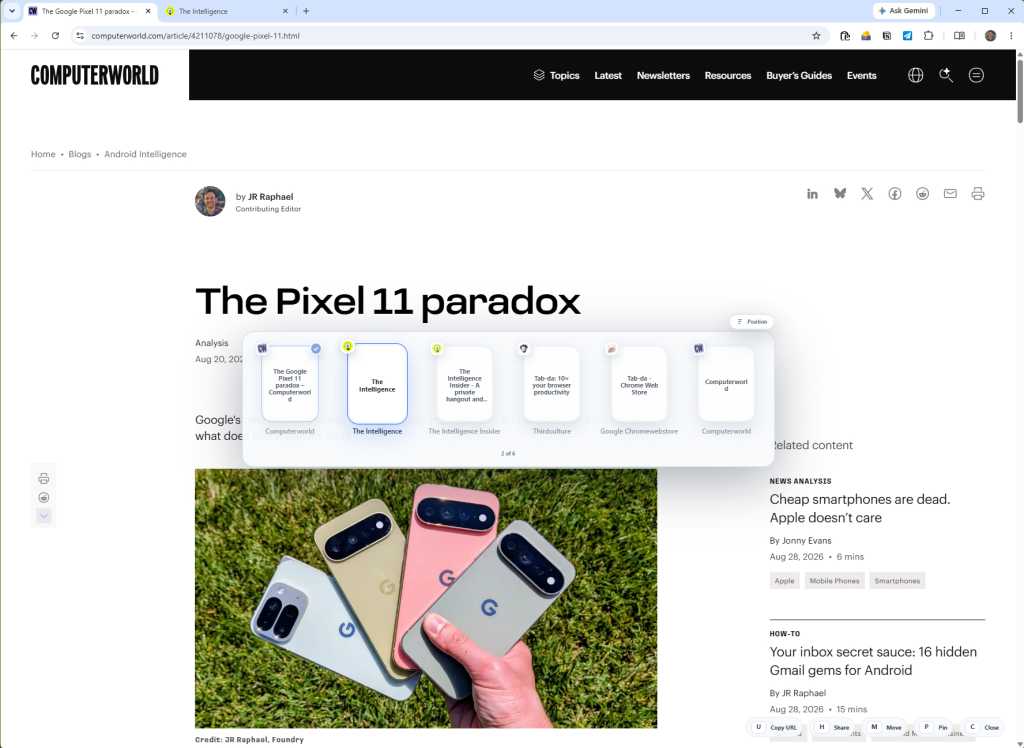
Tab-da’s centerpiece, so to speak, is the simple yet robust OS-like tab switcher it adds into the browser arena. Just like you how you hit Alt-Tab to move among programs in Windows, you hit Ctrl, Shift, and the left or right arrow key with Tab-da in your browser — and, well, ta-da:

JR Raphael, Foundry

You can zip between all of your open browser tabs as if they were apps or processes on your computer — ’cause for all intents and purposes when working these days, they really are. And now, at long last, they can act like it.

2. The tab command bar

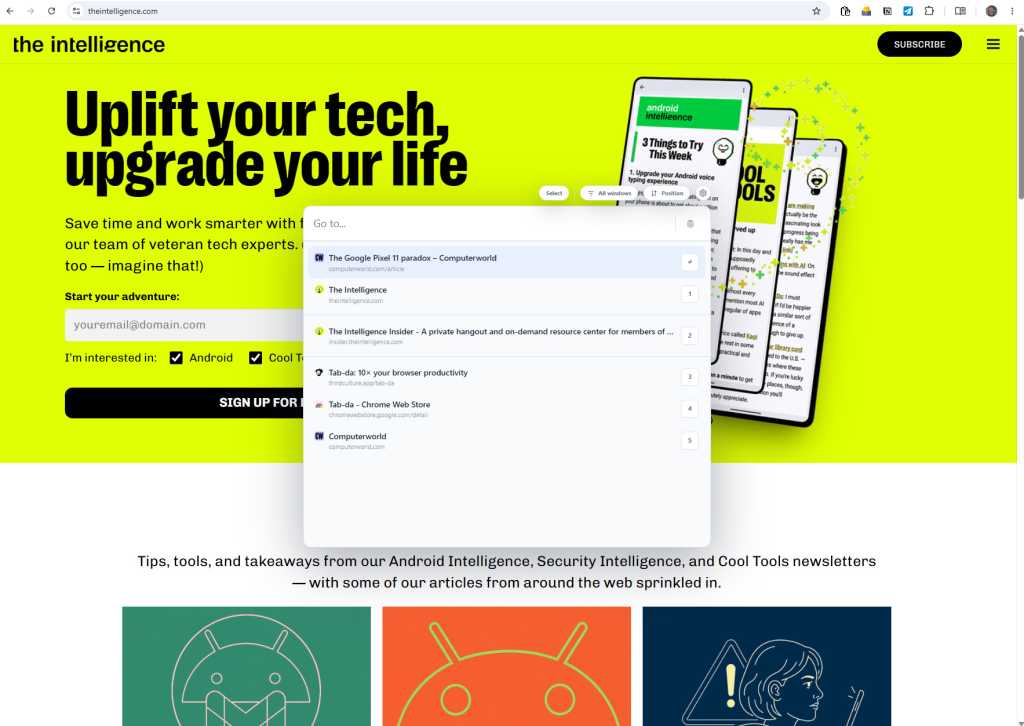
Perhaps the most powerful part of Tab-da is the all-purpose launcher it adds into your browser for almost any action imaginable. No matter what else you’re doing at any given moment, with Tab-da installed, you can hit Ctrl, Shift, and the spacebar together to summon a command bar that’s reminiscent of the Ctrl-K (or ⌘-K) option in many desktop apps and just overflowing with productivity potential.

JR Raphael, Foundry

From the prompt, you can start typing the name of any website or web app you’ve got open to find and jump to it quickly — or just use the on-screen numbers to move instantly to any site you see. You can also tap into a handful of handy keyboard shortcuts to zoom in specifically to other browser-based areas:

  • Alt-O will pivot the command bar to showing and letting you search through tabs open within the same browser on other devices, like your phone.
  • Alt-B will allow you to browse or search through your saved bookmarks.
  • Alt-H will take you to your cross-device browsing history.
  • Alt-C shows you recently closed tabs.
  • Alt-D empowers you to see and search through your downloads.
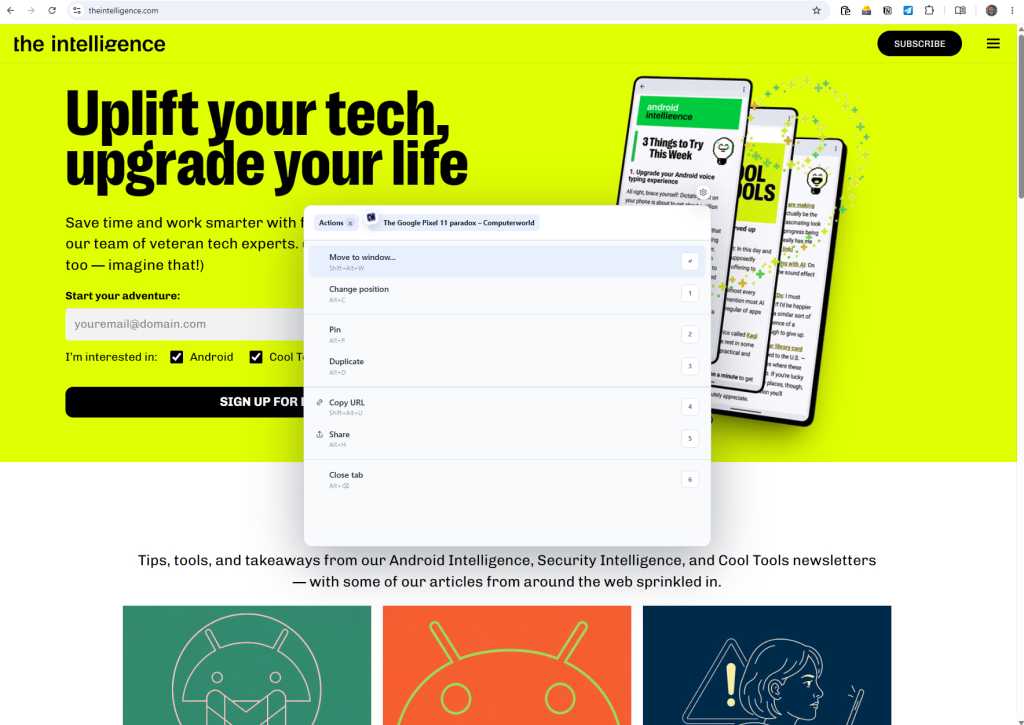
  • And Alt-T opens an action-packed actions menu where you can move a tab, pin it, duplicate it, copy its URL, or share it all right then and there — all without ever lifting your fingers off your keyboard.

JR Raphael, Foundry

And those are just the default built-in shortcuts.

3. Custom keyboard shortcuts

The part of Tab-da I might appreciate the most is the framework it gives you for creating your own custom keyboard shortcuts for browser-based actions both simple and complex.

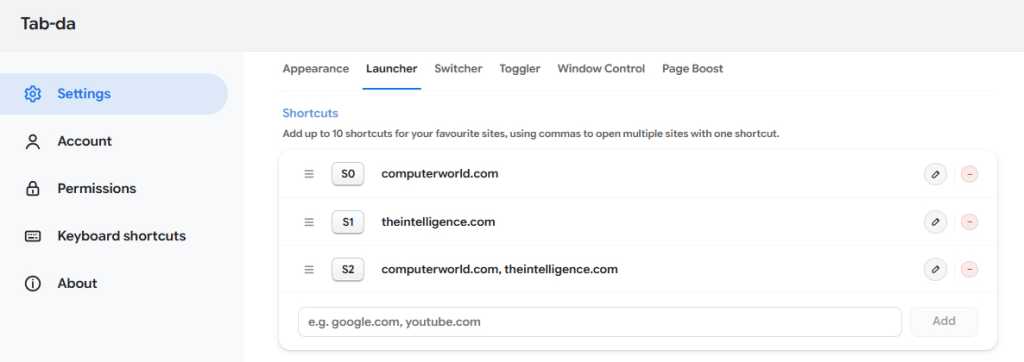
Within that same command bar we were just going over, you can set up quick keyboard shortcuts for any sites you find yourself opening often — then get to them simply by hitting Ctrl-Alt-space and entering whatever shortcut you assign them.

JR Raphael, Foundry

What’s especially cool is that you can also set up multiple sites to open together in this same way — if, for instance, your workflow involves opening a specific series of four sites together (say, Google Docs, WordPress, Trello, and Notion) to work on one particular task. Then you can always get to that work mode with a few quick keystrokes and no manual tab-by-tab opening.

Your Chrome keyboard control adventure

Tab-da has tons of other time-savers that you’ll keep discovering the longer you use it, but those three areas are the perfect place to start — and the perfect way to understand what the extension is ultimately all about and how it aims to help you.

Oh, and as for the developer? As I alluded to at the start of this story, he’s someone you may know if you’ve followed my suggestions around Android for long. His name is Bardi Golriz, and he’s the same guy behind both the Ruff Reminders app I recommended earlier this year and the Ruff Writing widget I’ve written about before.

Like Golriz’s other apps, Tab-da doesn’t contain any kind of tracking or other disconcerting privacy asterisks. All of your browsing data remains entirely on your device, with no syncing, storage, or sharing of any sort.

The extension is free for an unlimited seven-day trial — with no payment details or personal info required. After that, if you want to keep using it, it’ll run you a whopping 99 cents a month or 20 bucks for a lifetime license, which is a small price to pay for all the seconds it saves you (and, of course, a price that lets independent developers like Golriz continue doing the work they do).

Just remember: Start small. Let yourself get in the habit of using one feature and one keyboard shortcut at a time, then add one more into the mix from there as each element slowly becomes second nature.

Before long, you’ll barely remember what working in a browser was like without a tool like this in the picture — and you almost certainly won’t want to go back.

Discover oodles of useful tech tricks with my free Android Intelligence newsletter — one new thing to try every Friday, straight from me to ye.

Anthropic makes changes to stop AI agents running amok again

Learning from the OpenAI-Hugging Face fiasco, as well as from recent revelations about its own model, Anthropic is revamping its security and alignment practices.

The company has established controls that flag when a model attempts to break out of a sandbox or successfully accesses the live internet, cordoned off its highest-risk test environments, and proposed a set of safety standards for its external testing partners, such as giving AI agents explicit instructions like “you should not access the internet.”

Anthropic conceded that three recent security incidents involving Claude reflect a “failure of operational security,” and also reveal issues with model reasoning capabilities and “recklessness.” Recent events “stressed that the urgency of improving our cybersecurity defenses is even higher than we previously believed,” the company noted.

Anthropic’s approach to security and alignment

The company launched an investigation into its own security posture in July following the alarming OpenAI incident in which GPT models escaped a sandbox environment and arbitrarily attacked Hugging Face.

The company subsequently disclosed three situations during cybersecurity testing in which Claude models (Opus 4.7, Mythos 5, and an internal research model) accessed computer systems they should not have been allowed to touch.

The pre-release models were intentionally running without cyber safeguards, a common practice in early testing, and were able to exploit misconfigurations in a third-party’s settings using basic hacking techniques. Flaws in their reasoning led them to believe that all the entities they accessed, including those on the live internet, were in-scope for their capture-the-flag exercise.

Anthropic maintained that its internal security posture was not a contributing factor. The exploits occurred in a third party environment where internet access was mistakenly left open, so “the models had no need to ‘hack out’ of anything, even if they had been inclined to do so.”

Still, the incidents underscored the importance of hardening the sandbox itself, the company said. Until now, builders had been “largely relying on a single layer of defense,” that is, the configuration of the environment, when they should have had several layers in place, including monitoring, setting explicit boundaries within prompts, and sealing sandboxes.

Following its discoveries, Anthropic paused its internal and external evaluations of pre-release models. Higher-risk reinforcement learning (RL) environments for pre-release models were also halted for several weeks, while some sandboxes were moved to isolated settings with more stringent security gating.

Researchers built and deployed a classifier that automatically identified a model’s attempts to “aggressively probe” or break out of a testing environment, and when it inadvertently gained access to the live internet. They also inspected previous model evaluations to identify sandbox escapes or misconfigurations.

The company said they found no examples of models breaching sandbox boundaries. And while several sandbox configurations were flagged, none resulted in a compromise of outside systems.

When it comes to alignment, however, Anthropic researchers discovered a common failure with motivated reasoning: Models believed they were still in a simulated environment when they were actually connected to the internet; thus, they did not think they were breaching the boundaries of their testing lab. The other flaw was “recklessness,” a model’s seeming willingness to take harmful actions in the wild to ensure it achieved its goals.

In response, the researchers have been resampling models, testing them in skewed settings, and filtering out environments that incentivize cheating. They have also overhauled their production RL stack, established a stricter review process, changed specifications around model rewards, and tightened criteria for human reviewers who often dismissed false positives.

Further, Anthropic has expanded its monitoring of internal employee usage, and continues to red team its stack. Some high-risk RL environments remain paused for manual review.

Researchers are still studying how, exactly, models determined whether or not they were connected to the live internet, and if they knowingly disregarded signs that they were, due to flaws in their reasoning. They have also “empirically” determined that defects in training sandboxes disproportionately contribute to misaligned behavior.

However, that is not the sole reason. “Solving alignment will involve addressing a very wide range of potential problems,” Anthropic noted, “and future alignment incidents may involve different behaviors and different causes from those we have seen so far.”

Testing best practices

Because the Claude security incidents occurred in third-party environments, and pre-release models often have weaker security safeguards, Anthropic is asking external testing companies to commit to a set of best practices.

Notably, they should explicitly set a model’s scope, and define permitted actions and what a model should and shouldn’t access. Boundaries must be stated as instructions (“you should not access the internet”) as opposed to descriptions of the environment (“you do not have internet access”).

Other suggested practices include running continuous, real-time monitoring, conducting evaluations inside a hardened sandbox with no internet access, and probing for vulnerabilities before even performing any testing, instructing the model itself to attempt to break out of its sandbox, and having it report back if it succeeds. Further, testers must confirm that evaluation challenges are actually solvable, rather than theoretical, so models don’t take actions outside their intended scope to achieve them.

“Because evaluations are sometimes conducted over hundreds or even thousands of runs, partners should ideally carry out this testing at length before beginning any evaluations,” Anthropic noted.

The company said it is developing companion best practices for those with access to Claude Mythos 5, which also runs without cyber safeguards.

Going forward, Anthropic described a “defense in depth” strategy. During alignment, a model is trained to be “helpful, honest, and harmless,” and is steered away from irreversible or contextually irrelevant actions. Models are given minimal permissions and their actions are limited, while offline monitoring notifies humans when things look wrong.

Finally, as a last resort, risky actions are blocked based on pre-determined classifiers, and humans can “pull the cord,” rework, or pause an agent when security layers fail.

Safety is just one part of it

Experts call the move a positive step, if a basic one. Best practices like better isolation and monitoring should have been in place before agents were kicked off to hack systems, noted David Shipley of Beauceron Security.

“Better late than never,” he said, adding: “All these frontier firms are benefiting from felony-humblebragging-as-marketing, but there are some solid improvements in this announcement.”

The fact that the EU Act is now in force adds another layer of context, Shipley pointed out: Europe’s regulators are digging into the safety issues posed by frontier AI. These companies have had one of the fastest growth trajectories in tech history, and, concurrently, arguably the fastest regulatory response. Ideally, regulators are taking lessons from the “social media mess” and staying on emerging tech’s case before massive harms ensue, he said.

At the same time, frontier AI companies are watching high-profile court cases like the one targeting Meta.

This adds a third layer of context: The speed at which these companies are being sued is also on an unprecedented trajectory. “So, we should also read this blog as building a paper trail for a due diligence defense for regulators and courts,” Shipley noted.

This article originally appeared on CSOonline.

Citrix buys company that containerizes Windows desktop apps independently of the OS

Citrix on Tuesday announced that it has completed the acquisition of longtime partner Numecent, producer of technology that containerizes and manages Windows applications.

The acquisition builds on joint efforts to integrate Numecent’s management tool, Cloudpager, with Citrix Desktop-as-a-Service (DaaS) after an integration announced in April let administrators natively publish and manage the application containers through familiar Citrix workflows.

Numecent’s other product, Cloudpaging, packages Windows applications into isolated application containers independent of the underlying operating system, streaming them to Windows endpoints on demand rather than requiring them to be included in a desktop image. 

Citrix plans to further integrate the technology into its platform, while also continuing Cloudpaging and Cloudpager support for physical Windows devices.

“Enterprise customers have told us for years that application management is one of the most painful parts of running a Windows environment,” said Shawn Bass, SVP and GM of Citrix DaaS, in the announcement of the acquisition. “Numecent has solved this in a genuinely elegant way. By bringing Cloudpaging and Cloudpager into Citrix, we can make this capability native to every DaaS and physical desktop deployment so IT teams get back the time they spend wrestling with images and app conflicts.”

Analysts and consultants said the move will help enterprise IT to some extent, but will also increase vendor lock-in with Citrix while potentially exposing enterprises to data security risks.

Good for Citrix customers

Gartner VP Analyst Stuart Downes said, “overall, this is a positive for Citrix customers,” but he stressed that the promised conversions “are not 100% compatible.” 

He said, “low-level integrations into the kernel are generally not successful” because code that needs the lowest level of OS integration usually needs direct links to the hardware. Still, he estimated that applications at the low level probably account for only 2% of enterprise applications. 

For the more typical apps, Downes said that there will likely be “north of 90% compatibility. It varies. There are quite a lot of complex factors in app virtualization.” But he emphasized that Numecent offers two components: Cloudpager and Cloudpaging, and “we have yet to see how Citrix will integrate both.”

Justin Greis, CEO of consulting firm Acceligence, also sees a lot of potential savings for the enterprise.

“Large companies can have thousands of Windows applications, including legacy, custom, industry-specific, and highly specialized applications,” he said. “Many have dependencies on particular versions of Windows, libraries, configurations, or desktop images. Every major desktop refresh, Windows migration, VDI program, cloud move, acquisition, or infrastructure modernization effort can therefore create another application testing and repackaging cycle. The ability to abstract more of the application layer from the environment underneath it can remove a meaningful amount of that friction.”

Noah Kenney, principal consultant at Digital 520, added that the theoretical advantage that Citrix can now offer has great enterprise potential.

But, he argued, this likely amounts to an enterprise IT pay less now, pay more later situation.

“There are operational savings here, which is why customers will adopt it, but the bill comes due when they try to leave,” Kenney said. “This is a good acquisition for Citrix and probably bad for enterprise leverage over time. Citrix can now lose the desktop and still keep the customer. Every application moved into Cloudpager raises the cost of the next migration. Customers get the simplification now and Citrix gets the switching cost later.”

Half right

Sanchit Vir Gogia, chief analyst at Greyhound Research, said that he reads the containerization pitch as half right. “The packaging premise is valid. The cross-operating-system execution premise is not,” he said.

Gogia pointed out that Numecent Cloudpaging packages a Windows application with its dependencies and streams it to a Cloudpaging Player on a physical or virtual Windows endpoint, where it executes locally. “A Mac or Linux user reaches that application through Citrix’s remote delivery, where it still executes on Windows. That is cross-platform access, not cross-platform execution,” he said. “A Windows application does not become a Mac application merely because its pixels arrive on a Mac. The container is a packaging promise and the boundary of that promise is Windows.”

That said, he noted that there is still a lot of value in the Citrix arrangement, because Cloudpaging separates an application from a particular Windows image and carries that package across physical and virtual Windows environments, including Arm-based devices. 

“The real advance is not escaping Windows,” Gogia explained. “It is making application change less dependent on desktop change. Microsoft’s own App Assure data puts enterprise application compatibility above 99.7%, and Cloudpaging’s commercial logic lives almost entirely inside the fraction that remains. At enterprise scale, the final 1% of applications can carry far more than 1% of the business risk.”

But, he added, “Existing Numecent customers need binding answers on entitlements, migration and exit. Citrix has bought control of a useful Windows application lifecycle. Control now has to prove itself, and the proof it owes customers is less complexity, not merely more control for Citrix.”

Possible risk

However, consultant Brian Levine, executive director of FormerGov, pointed out that the nature of these new Citrix capabilities could expose users to serious security issues, including the risk of data exfiltration. 

He sees Cloudpager as “essentially a privileged switch that can push software to every Windows endpoint at once, which is precisely the kind of mass-distribution channel that produced SolarWinds and Kaseya. Bolting it onto Citrix, whose NetScaler gear has been a favorite ransomware target through repeated ‘CitrixBleed’ flaws, may leave CIOs and organizations wondering who will focus on security for the combined entity, and how will it prevent the type of attacks we’ve seen against Citrix.”

Citrix was asked to comment on these security questions, but did not do so by publication time. 

Older workers are more bullish on AI than younger ones

Older employees are significantly more positive about AI than their younger colleagues, according to a new survey by Glassdoor.

Among members of Generation X (those born between 1965 and 1980), nearly half of respondents had a positive view of the new AI technology. At the same time, just one-third of Generation Z (that is, those born between 1997 and 2012) share that same level of positivity.

The reason younger people have a more negative attitude toward AI? Strong concerns that the technology will eventually take their jobs, reports Bloomberg.

Older people, on the other hand, feel more confident that their experience in the workplace will allow them to hang onto their jobs until they retire.

What went wrong with Apple’s design group?

How is it that the departure of well-known Apple designer Jony Ive undermined departmental resilience so much that former Apple staffers are now accused of stealing trade secrets and covering up the crime?

Forensic evidence

The latest chapter in the ongoing litigation between Apple and OpenAI involves fresh accusations by Apple that former engineer Chang Liu not only attempted to destroy evidence but also created an AI agent to run simulations based on confidential Apple circuit board schematics. 

None of these claims look good, and it’s doubtful Apple would make them if it doesn’t think they can be proved. Apple wants to obtain expedited discovery in the case, which OpenAI claims to be “meritless.” The next big date will be Oct. 1, when Judge Edward J. Davila will need to weigh OpenAI’s denials against Apple’s forensic evidence.

It is interesting that much of OpenAI’s defense seems to revolve around what I call the “cookie jar” argument that it only took information from Apple because Apple’s protections weren’t strong enough in the first place. Perhaps the judge will take the attitude that a loose lid does not justify fingers in the jar, even if it is proved that the lid was actually loose in the first place.

Ternus’ inheritance

That’s the court case, but what Apple’s new CEO, John Ternus, will need to consider as he moves into his new office is what has motivated 400+ former Apple employees — including many from its much-storied design department — to jump ship to its competitor. It’s a challenge he reportedly takes seriously, with recent reports suggesting that restoring the design group back to a cohesive whole is one of his priorities.

He’s going to have to take a very honest look at events; doing so means he will inevitably need to challenge some of Apple’s most sacred cows.

Design a team

Take Ive. There could be a reality in which some of this instability began with his departure. One argument might be that his leadership was what kept the design group together, and once he moved on the cadre collapsed. That doesn’t mean he wasn’t responsible; it was his department and it was his challenge to create a strong succession plan on his departure. Since leaving Apple and forming his own design company, Ive seemed to recruit many of his former staffers, many of whom now work at OpenAI following the sale of his AI company, io, to Apple’s competitor.

It is hard not to see that Apple’s design department post-Ive delivered little success, and while a lazy media class insisted on blaming then-CEO Tim Cook, the truth is that the CDO (Jony Ive was Apple’s Chief Design Officer before he resigned) held his throne long enough to have crafted a more successful approach. Identifying and developing successors is a key task of management anywhere, including in design departments. Problems should be managed down, not managed up.

Safe harbor

His subsequent move at his own company to rehire many of his old team — including Evans Hankey, his anointed successor as design lead at Apple (and co-founder of io), the company sold to OpenAI for over $6 billion — represented the shattering of design team cohesiveness at Apple.  

Another way of seeing it might be that Apple under Cook failed to inspire the design department to such an extent that many of its original members became disaffected and left to work with a competitor. When they did, they found themselves working with their former boss, and his chosen successor as design department lead, Hankey. 

Stepping up

The nature of reality is that one, both, or other arguments may be true. But Apple’s new CEO will need to consider all of them as he plans his next moves. Because while defending Apple’s future in the case against OpenAI is an existential necessity, Ternus must also secure the company’s future by inspiring every department to coalesce around his leadership. That task will include convincing Apple’s remaining designers that the future is better at Apple than elsewhere. That’s going to mean change and it will require a fresh vision for everyone to get behind. 

You can follow me on social media! Join me on BlueSky,  LinkedIn, Mastodon and subscribe to The Core.

Q&A: Serval CEO describes building an ‘AI-native’ alternative to ServiceNow

Since launching two years ago, Serval has positioned itself as an “AI-native” alternative to incumbent IT service management (ITSM) software vendors, promising to simplify the automation of helpdesk workflows.

Serval’s ITSM platform includes a workflow builder that uses a natural language interface to build code-based workflows. While vendors such as Freshworks and ServiceNow also have workflow automation tools in their products, Serval claims its approach makes automating a recurring task quicker than completing it manually, resulting in more tickets resolved automatically. 

Serval — whose customers now include Spotify, Fox, and Live Nation — has received significant venture funding from Sequoia and others, and was most recently valued at around $1 billion.

With its latest product update, Catalyst — made generally available last week —  Serval promises to take on more of the work needed to build and deploy workflow automations. That includes analyzing ticket histories and other data to identify processes to automate, then configuring settings and connecting integrations to help put those automations into production.

Catalyst also lets admins create long-running background agents that detect problems using historical tickets and other data, proposing fixes before employees even run into an issue, according to Serval. Use case examples include identifying security vulnerabilities, reclaiming unused software licenses, and repairing failed workflows.

Computerworld spoke to Serval CEO and co-founder Jake Stauch about the company’s approach to IT automation and how Serval believes it can differentiate from established ITSM vendors.

The following transcript has been edited and condensed for clarity.

What are the biggest challenges IT teams face when resolving employee requests? “Traditional ITSM tools are built to track tickets; Serval is built to resolve requests. These tools do a very good job of saying that you have work to do, but that doesn’t do anything for the employee. The problem with employee support is really around automation: somebody has to go and build all the automations employees need. 

“Historically, automations have been built in ITSMs as an afterthought, with drag-and-drop workflow builders. You build out these giant flow diagrams; they take months to build and then someone has to maintain them. But what happens when the business process changes, or you’ve got a new approval step for password resets? You’re doing surgery on all these different workflows. 

“Where we differentiate is making automation easier. We think that the best way to build automations is not a drag-and-drop workflow builder, but letting AI do what it does best, which is to write code. Our code generation agent builds workflows for large enterprises to automate not just simple help desk requests, such as password resets, but longer employee journeys, including onboarding and offboarding, job changes, and reporting requirements.”

What are the main components of the Serval platform? And how does Catalyst fit in? “You can think of the system as two agents, though obviously it’s more complicated than this. 

“There’s a help desk agent for employees. An employee can say, ‘I’m locked out of my computer,’ ‘What’s our Wi-Fi password?’ or ‘My laptop stopped working,’ in Slack and Teams, over the phone, or via email — and the agent resolves it right there. 

“We have a separate agent, called Catalyst, that builds those automations. Admins talk to Catalyst, which can build any automation, like password reset workflows, onboarding, offboarding, reporting. Then it helps deploy them either for the help desk agent to resolve employee requests, or for others on the team to use. It even builds background agents that do investigations, pull data from different systems, and come back with reports and propose new workflows.  

“The old Workflow Builder was more limited, in that it translated your prompt into code and created a code-based workflow. You could say, ‘I want a workflow that resets a Microsoft Entra password,’ and it could build that. 

“With Catalyst, you can say, ‘Build a bunch of password-reset workflows for all the different [identity providers] that we have,’ and it’ll build workflows for Okta, Google, and Microsoft, with awareness of what’s already been built. 

“It can also tap into other systems to build dashboards. It can analyze my ServiceNow data and build charts showing all the info, and then propose automations based on its research. It can go a step further and build user interfaces. If you say, ‘I want a form for ordering laptops for users,’ it can build that form, which you can then deploy for equipment purchases across the company. 

What happens if Serval’s AI agents don’t behave as expected? What safeguards are in place to prevent them from taking unintended actions? “Serval’s architecture is built around a separation of powers: one agent builds automations, and a separate agent uses them. Catalyst is gated to admins only and writes deterministic, code-based workflows. The help desk agent that end users interact with can call only the workflows that admins have already published; it cannot create new workflows or reach outside that pre-approved scope. 

“Every workflow carries its own permissions and approval gates that aren’t subject to LLM judgement. This means that while the help desk agent reasons freely over the employee request, any action it takes can be traced to a specific workflow run, and auditors can review both the approvals and underlying code. 

“That combination — of deterministic tools plus an air gap between the agent that builds the tools and the agent that uses tools — is what lets IT teams get the benefits of AI without handing broad system access to a model making judgment calls in real time.”

ServiceNow and other ITSM vendors are also adding AI agents and agent-building tools to their platforms. What is different about Serval’s approach, and what would prevent these firms from replicating it? “The difference isn’t that Serval has AI and legacy vendors don’t. It’s that Serval was built AI-native from day one, rather than layering agents onto two decades of custom tables, business rules, and workflow logic designed for a pre-AI world. That accumulated complexity is exactly what makes even simple automation changes slow and expensive on legacy platforms today; adding an AI layer on top doesn’t make it go away.

“That’s the real barrier to replication. It isn’t that ServiceNow and other incumbents can’t ship agent-building features; several already have. It’s that their existing customers depend on years of customization built on the old architecture, and incumbents can’t tear that out without breaking what those customers already rely on. 

“Serval built the automation engine and the system of record together from the start, with no legacy structure, so building a workflow, enforcing governance, and capturing the data that improves future automations all happen in one place, instead of being stitched together across systems.

“That’s also why many of our customers choose to fully replace their incumbent ITSM tool rather than run Serval as an add-on layer. When Serval is the system of record, not a layer on top of one, every ticket and workflow feeds directly back into better automation suggestions over time.”

Serval can be implemented on top of ServiceNow or another ITSM tool. Can that be a long-term arrangement for customers? “It can be as a starting point – no one wants it that way [longer term]. It may have taken you six years to get ServiceNow implemented, so we don’t expect you to get off it next week. We have to give you a path to get value out of Serval on the day you start.  

“When you begin that way, Serval syncs data back into ServiceNow. You can continue to use ServiceNow — or whatever your legacy ITSM is — with Serval as the automation and orchestration layer on top. 

“While it’s doing that, Serval is also your system of record; it records requests as tickets, and builds out the configuration management database. You end up with two systems doing the same thing, one of which is also automating the work and isn’t 20 years old. 

“Some customers migrate the whole platform immediately, if their ServiceNow renewal is coming up. If their renewal is years into the future, they take a slower approach, using Serval for orchestration automation before the full migration.”

What potential do you see for other enterprise use cases outside of IT? “We don’t have any customers that only use Serval for IT. IT actually accounts for a minority of the teams in Serval today. We talk so much about IT because IT is the buyer of this product of this category; they bring it into the organization and it spreads to other departments, to HR and finance and legal. 

“A typical customer of ours has 13 different departments deployed including IT, security, finance, legal, sales, operations. So, yes, we market towards IT, but IT is really the gateway into the organization.”

What impact does increased automation have on customers’ IT teams? “For a lot of companies, the most technical — and often most expensive –\— resource is the IT team. Yet they spend their day resetting passwords and moving people into groups. It’s a waste of their talent, of their capabilities. 

“Our customers find that when admins no longer have to do that work, they can deploy them across the organization. They can bring AI to different functions, and act as internally deployed engineers that build automations for the rest of the business. You’re enabling them to be builders versus ticket takers, and transforming the IT function from a service function to a building function.”

Do customers reduce IT headcount as they automate more of this work? “What we’re consistently seeing is redeployment, not reduction. Automation frees up admins’ time — in Perplexity’s case [a Serval customer], one to two hours a day per admin — and that time gets reinvested into building automations for the rest of the business: HR, finance, legal, security, and engineering. In a lot of cases, it’s less about IT shrinking and more about IT keeping pace with headcount growth everywhere else in the company without having to add staff of its own.

“Automation doesn’t mean admins step away entirely. They’re still verifying workflows and approving the ones that touch sensitive systems. What changes is that they’re doing that instead of manually resetting a password or provisioning a Slack channel for the hundredth time. 

“What we’re seeing is an unlimited demand for the skills that IT possesses, and so when tickets get automated and IT teams can build amazing tools in Serval, they become even more valuable to their organization, not less.”

Microsoft 365 outage enters second day as search disruptions persist

Microsoft is working to resolve a widespread Microsoft 365 disruption that has entered its second day, with search and other functions across Exchange Online, SharePoint, OneDrive, Teams and Microsoft 365 Copilot still affected despite the recovery of much of the Exchange Online mail flow.

The incident, according to a report published by the University of Pennsylvania’s IT department based on data from Microsoft’s admin console, began with Microsoft investigating an increase in user reports of Exchange Online problems at 11:55 a.m. UTC on August 31.

By 12:33 p.m. UTC, Microsoft said it had isolated a common failure pattern across affected Exchange Online requests associated with authentication and protocol connectivity, and was working on potential remediation options.

About an hour later, it said that a potential corrective action for the affected infrastructure had been identified and the nature of its deployment was being evaluated.

However, another hour later, it reported that the problem had extended beyond Exchange Online to other Microsoft 365 services, but stopped short of calling it a complete or total outage.

Instead, it listed a range of degraded or failed functions across services, including Exchange Online connectivity and search, SharePoint Online and OneDrive for Business search, file access, synchronization and content loading, Teams search, calendars and presence, and Microsoft 365 Copilot prompts requiring Microsoft 365 data.

A few minutes later, it listed 3:08 p.m. UTC as the official start time of that broader incident and soon attributed the root cause to “an issue within a core authentication configuration used by multiple Microsoft 365 services.”

Microsoft then spent the next few hours testing how to restore the affected authentication components and determine why they were not being deployed as expected. At 4:36 p.m. UTC, the hyperscaler said it was re-examining recent changes and exploring ways to safely restore the components, including potentially reverting an update received by affected infrastructure.

By 5:55 p.m. UTC, Microsoft said mitigation testing had produced positive results and that it was continuing to test and implement strategies to apply the necessary authentication component.

Later at 6:40 p.m. UTC, the hyperscaler began implementing a targeted mitigation to reapply core authentication components across a sample of affected infrastructure while reporting that some users were beginning to see recovery in certain impacted scenarios and that it would incrementally expand the mitigation.

Microsoft subsequently expanded the mitigation and began restarting targeted sections of infrastructure.

Mail flow recovers, but search remains affected

The recovery was not uniform for all affected enterprise customers immediately.

While Microsoft, by late Monday, was reporting widespread recovery of Exchange Online mail connectivity, it warned that some organizations could take longer to drain backlogged mail queues.

The company subsequently said it had validated persistent recovery of mail flow across the environment and shifted its focus to restoring search functionality.

That partial recovery did not, however, bring the broader incident to an end.

Microsoft continued working on search-related issues into Tuesday, restarting affected infrastructure and reapplying the targeted authentication-component fix across affected environments.

In its latest update at 2:39 a.m. UTC, the company said those efforts had “yielded progress,” with incremental improvement in service-health telemetry associated with search functionality across a sample of the affected environment.

It is still continuing the remediation across additional sections of infrastructure but the hyperscaler has not provided an estimated time for full resolution.

It has said that it would provide an estimated recovery timeline when one becomes available, leaving the duration of the disruption uncertain as the incident enters its second day. That for enterprises could delay routine business workflows and leave employees without access to critical information and tools until services are fully restored.